
The suppression list
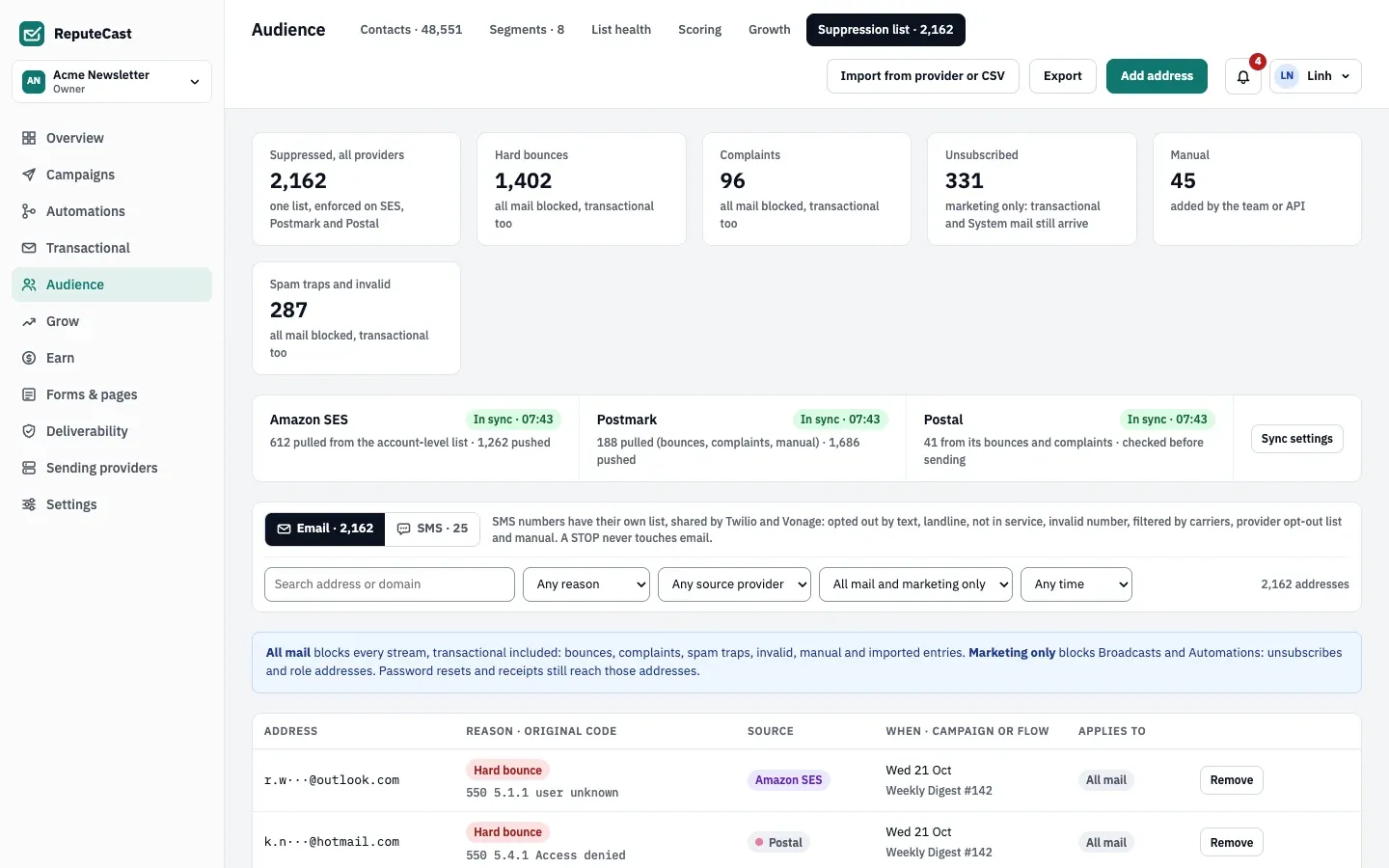
The suppression list holds every address ReputeCast must not mail. There is one email suppression list per workspace, shared by every sending provider: an address that hard-bounced through Amazon SES is never sent to through Postmark either. Every send checks the list first, whatever the segment, list or route says.
How addresses get on the list
Section titled “How addresses get on the list”- Events from sending providers. A hard bounce, a complaint or an unsubscribe reported by a provider’s webhook adds the address at once, with the provider’s original code. A report read from an SMTP bounce mailbox counts only when it is about a message ReputeCast sent and names that message’s recipient. Soft bounces don’t, with one exception: when a Transactional message soft-bounces and the address has soft-bounced 3 times within 7 days, it is suppressed for all mail as an invalid address.
- Unsubscribes. The unsubscribe link, one-click unsubscribe and the unsubscribe page add a marketing-only entry.
- Imports. Contacts who unsubscribed, bounced or complained in the old tool become suppressions, and the import can pull what your sending providers already block. See Import contacts.
- Address checks. Invalid addresses found by a verification service are suppressed for all mail.
- Your team. Suppress a contact from its profile or in bulk, add addresses by hand, upload a CSV, or use the API.
- Provider sync. Suppressions from connected providers are pulled in (see below).
What each entry blocks
Section titled “What each entry blocks”| Reason | Applies to | Blocks |
|---|---|---|
| Hard bounce, Complaint, Spam trap, Invalid address, Manual, imported entries | All mail | Every stream on every provider, transactional included |
| Unsubscribed, role addresses | Marketing only | Broadcasts and Automations; password resets, receipts and other System or transactional mail still arrive |
The table shows each entry’s reason with the original code (for example 550 5.1.1 user unknown), its source (a
provider, the preference center, one-click unsubscribe, an import, a CSV upload, a verification service or a team
member), the campaign or flow that caused it, and what it applies to. Addresses are partly masked on screen. Rows from
one import are grouped, with View rows.
Manage the list
Section titled “Manage the list”Adding, uploading, pulling and removing need subscribers:edit (Owner, Admin and Editor). Exporting needs
subscribers:export (sensitive). Every change is in the audit log with your name.
- Add address: paste up to 1,000 addresses, one per line or separated by commas, with an optional note shown as the original code. They are blocked for all mail.
- Import from provider or CSV:
- Pull from your sending providers copies the bounces, complaints and unsubscribes your connected providers already block. Providers without a suppression API are skipped.
- Upload a CSV reads a column named
emailoremail address(else the first column), up to 16 MB and 100,000 addresses, for example the blocklist exported from your old tool. Pick the reason for the whole file.
- Remove asks for a reason (at least 3 characters). What happens next depends on why the address was there:
- Hard bounce, complaint, spam trap or invalid address: the contact goes back to pending and needs a new opt-in before it gets mail, so a bad address stays unmailed.
- Unsubscribed: only remove it when the person asked to resubscribe. They still need to rejoin their lists, for example through the preference center or a signup form.
- Manual: mail resumes on every provider.
- Export: downloads the whole list as CSV, with full addresses and the columns
email,reason,scope,source,source_provider,original_code,campaign_or_flow,suppressed_at.
There are no domain-wide suppressions; each entry is one address.
Sync with sending providers
Section titled “Sync with sending providers”The strip under the counts shows, for each connected provider, how many addresses were pulled from it and pushed to it, and when it last synced. Sync runs every 15 minutes, and again soon after a webhook reports new bounces, complaints or unsubscribes.
| Mode | Sending providers | What happens |
|---|---|---|
| Two-way | Amazon SES, Postmark, Mailgun, Mailjet, Resend, SendGrid, SparkPost | Their suppressions are pulled in, and ReputeCast’s are pushed to them. |
| Pull only | Brevo | Brevo’s suppressions are pulled in; Brevo can’t take pushes. |
| Local only | SMTP, Postal, Azure Communication Services, generic HTTP | Their bounces and complaints are added; ReputeCast checks the list before every send. |
ReputeCast itself stops sending to a new suppression at once, because every send checks the list. Pushing it to the
provider’s own list waits for the next sync. Sync settings opens
Shared suppression list sync on the provider events page, with each provider’s direction and
Sync all now (needs providers:manage). See
Delivery events and suppression sync.
Defaults and limits
Section titled “Defaults and limits”The sync interval, the 1,000 addresses you can paste at once and the 16 MB CSV upload are listed with every other default in Limits and defaults. None of them can be changed.
SMS suppressions
Section titled “SMS suppressions”Once texting is set up, an SMS switch shows the phone numbers that can’t get texts: opted out by text, landline, not in service, invalid number, filtered by carriers, the provider’s opt-out list, or manual. A STOP never touches email. Numbers that opted out by text can’t be removed; only the person can come back, by texting START. See Send SMS campaigns.