
Provider health and outages
ReputeCast checks every connected sending provider in the background and gives it a status. When an email provider outage starts, mail that must keep going out moves to its fallback on its own, a campaign’s share on the failing provider waits for your decision, and traffic switches back once the provider has been healthy for 10 minutes.
What the statuses mean
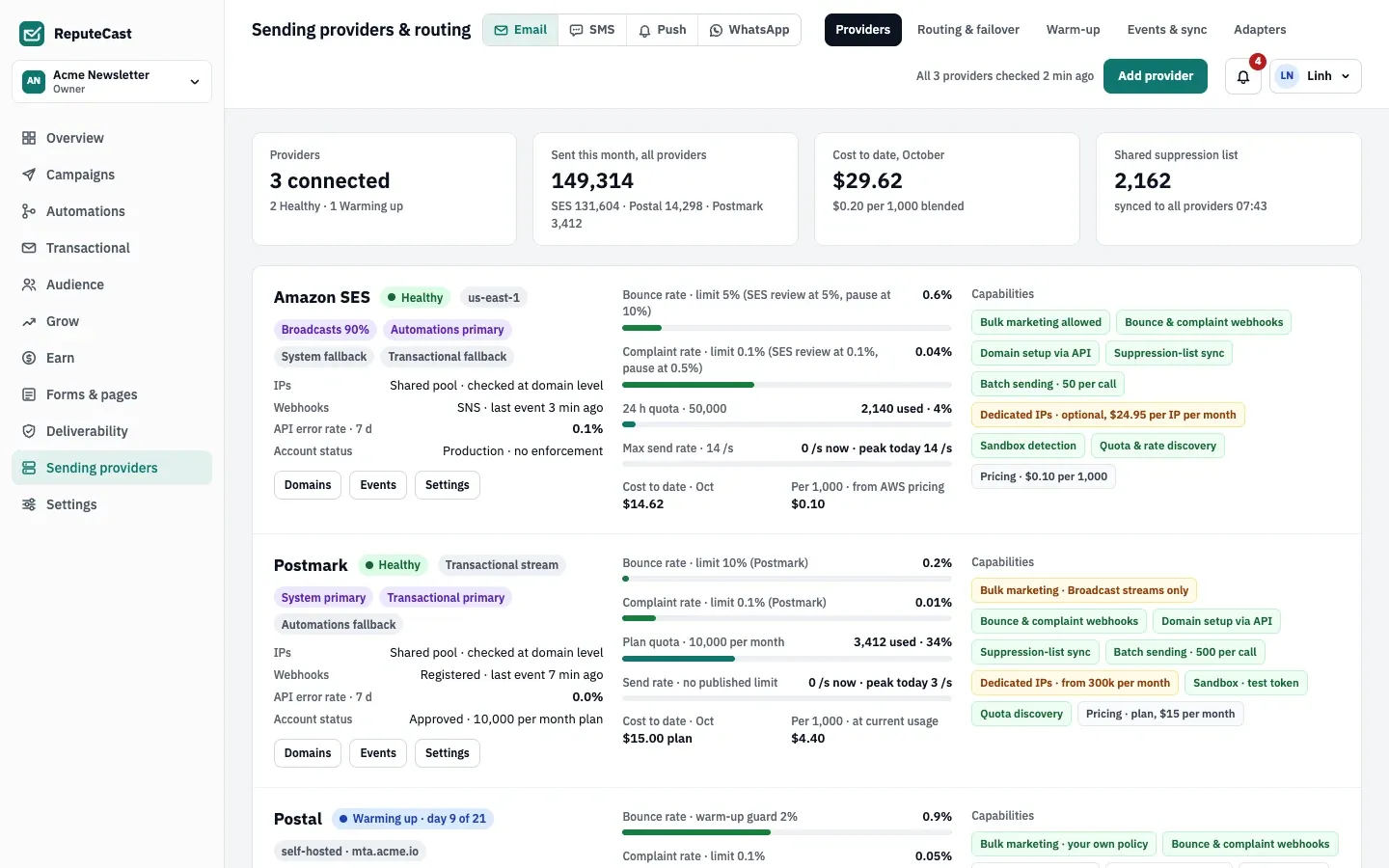
Section titled “What the statuses mean”Sending providers, then Providers shows a card per provider with its status, the streams it carries, its webhook freshness, its API error rate, quota and send rate, its cost this month and its capabilities.
| Status | Meaning | Takes new mail |
|---|---|---|
| Healthy | The last checks passed. | Yes |
| Warming up · day N of M | A warm-up plan is running; its daily cap applies to Broadcasts. | Yes, up to today’s cap |
| Sandbox · verified addresses only | The account can only send to verified addresses, such as the Amazon SES sandbox. | Only to those addresses |
| Degraded · webhooks silent | The provider accepts mail but has reported no events for 6 hours. | No, until events resume |
| Down | Calls are failing, or the provider rejected the credentials (“Down · auth failed”). | No |
| Paused | The provider is paused. | No |
The bounce and complaint rates on a card cover the last 7 days (or are the provider’s own figures, where it reports them). They are shown against the provider account’s limits, such as the Amazon SES review and pause levels, so you can see how close your account is to them. You can change the limits shown in the provider’s Settings. They are for reference only: the thresholds that pause a send are the workspace sending defaults.
How health is checked
Section titled “How health is checked”- Every 5 minutes, ReputeCast makes a read-only call to each provider (for example
GetAccountfor Amazon SES orGET /serverfor Postmark) and records the result, the quota and the send rate it reports. While a provider is Down or Degraded, it checks every minute. - Real sends count too: every API call during a send is recorded.
- A provider is marked Down after 2 failed checks in a row, or when at least half of at least 5 calls in the last 3
minutes failed. A
401or similar “credentials rejected” answer marks it Down at once. - A provider is marked Degraded when it has accepted mail but reported no delivery, bounce or complaint event for 6 hours. SMTP servers are exempt because their bounces come from a mailbox.
- A Down provider counts as recovered once calls succeed again (fewer than 1 in 10 failing) for 10 minutes. After you replace rejected credentials, it recovers at the next successful check.
The outage banner has a button to re-check the provider now instead of waiting for the next check.
What happens during an outage
Section titled “What happens during an outage”When a provider goes down, ReputeCast handles each stream that routes mail through it, following the stream’s failover policy:
- Automations, System and Transactional switch to the stream’s fallback automatically, if the fallback is available. The banner says how many emails were rerouted. Without an available fallback, new mail for the stream waits until the provider recovers.
- Broadcasts follow the Broadcasts policy. With the default, pause and ask, each campaign that is sending through the provider has that provider’s share held, while the other shares keep sending. Members who can send campaigns get a notification that the campaign is waiting for a decision. With warmed-up-only or automatic failover, the share moves to the fallback when the policy allows it.
For a held Broadcast share, the outage banner on the providers page offers three choices:
- Wait for the provider: the share resumes on its own after the provider has been healthy for 10 minutes.
- Move the held recipients to another provider you pick. If that provider is still warming up, ReputeCast warns you when the move would exceed its cap for today.
- Cancel send: the held recipients don’t get the campaign. What was already sent stays sent. This can’t be undone.
Waiting and moving resume the send and need campaigns:send; cancelling needs campaigns:pause.
A provider can also fail while a campaign is sending, before the next health check: the send holds that provider’s share after its calls have failed for 3 minutes (at least 5 calls), and the live monitor asks what to do with it. Read Monitor a send and auto-pause.
Members with providers:manage are notified when a provider goes down. Every step (down, failover, waiting, switched
back, recovered) is written to the Incident timeline, and the outage is recorded in the
audit log.
Switching back
Section titled “Switching back”After 10 healthy minutes, streams that failed over return to their primary, and Broadcast shares set to wait resume where they stopped.
Silent webhooks
Section titled “Silent webhooks”While a provider is Degraded, sending works but the status of new messages is unknown, so bounce protection for that route is blind. Until events arrive again, new mail is routed as if the provider were down: its share of Broadcasts is held, and other streams use their fallback when they have one. The banner shows what ReputeCast checked (the API, whether the webhook is still registered at the provider, whether ReputeCast’s endpoint is reachable from the internet), the likely causes and the messages still waiting for a status. From there you can choose Send test event, Re-register webhook or, where the provider’s API keeps past events, backfill their status. The banner clears as soon as events arrive.
Rejected credentials
Section titled “Rejected credentials”When a provider answers that the credentials are no longer valid, for example because someone rotated the API key at the provider, it is marked Down at once and its streams fail over as above. Replace the credentials in the provider’s Settings: ReputeCast checks the new ones with the provider before it stores them.
Defaults and limits
Section titled “Defaults and limits”| Setting | Default | How to change |
|---|---|---|
| Throttle per mailbox provider | Gmail no limit; Outlook 5/s; Yahoo 4/s; iCloud 3/s | Settings › Providers, 0–10,000 messages per second (0 = no limit) |
| Suppression sync with providers | Every 15 minutes, and right after a bounce adds addresses | — |
| Provider health check | Every 5 minutes; every minute while a provider is down or degraded | Fixed |
| Provider marked down | 2 failed health checks in a row, or 50% of calls failing over 3 minutes (at least 5 calls) | Fixed; rejected credentials mark it down at once |
| Healthy time before traffic switches back after an outage | 10 minutes | Fixed |
| "Webhooks silent" after | 6 hours without an event while mail is being accepted | Fixed; SMTP providers are exempt (they use a bounce mailbox) |
| Raw provider webhook events kept | 90 days | Fixed |
| Largest provider webhook payload | 5 MiB | Fixed |
| Provider webhook secret after rotation | The new secret replaces the old one at once | Settings › Providers › Webhook signing secrets |
| Bounce mailbox polling (SMTP providers) | Every minute, up to 200 messages each time | Fixed |
| Event polling when webhooks aren't set up yet | Every minute | Connect a provider › Use polling for now |
| Wait for the setup test message's delivery event | 30 minutes | Fixed |
| Messages per API call | Amazon SES 50, Postmark 500, Resend 100, Mailjet 50, SMTP 25 per connection; other built-in adapters 1 | Fixed |
When to change them
Section titled “When to change them”- Give every stream a fallback. A second provider turns an outage into a short failover for Automations, System and Transactional mail. Read Route mail across providers.
- Choose the Broadcasts policy deliberately. Pause and ask is the safe default. Fail over automatically, only to a warmed-up provider, if you’d rather keep campaigns moving and your fallback has a sending history.
- Make sure the webhooks can reach you. Silent webhooks are usually a reverse proxy, a firewall or a public URL problem. Read Reverse proxy and TLS and Troubleshooting.