
See where subscribers come from
Audience, then Growth shows how many contacts joined and left, through which signup form, page, API key or integration, and how good each source’s addresses turned out to be. Use the subscriber growth sources and the UTM parameters captured at signup to find the campaigns and pages that bring readers who stay, and the ones that bring typos and complaints.
Before you begin
Section titled “Before you begin”- Viewing Growth needs
subscribers:view; exporting the tables needsreports:view. Owner, Admin, Editor and Viewer have both. - UTM parameters and referring pages are captured by signup forms (embedded and popup) and the hosted subscribe page. Contacts from imports, the API and integrations have no first-touch page.
Read the Growth page
Section titled “Read the Growth page”-
Go to Audience, then Growth.
-
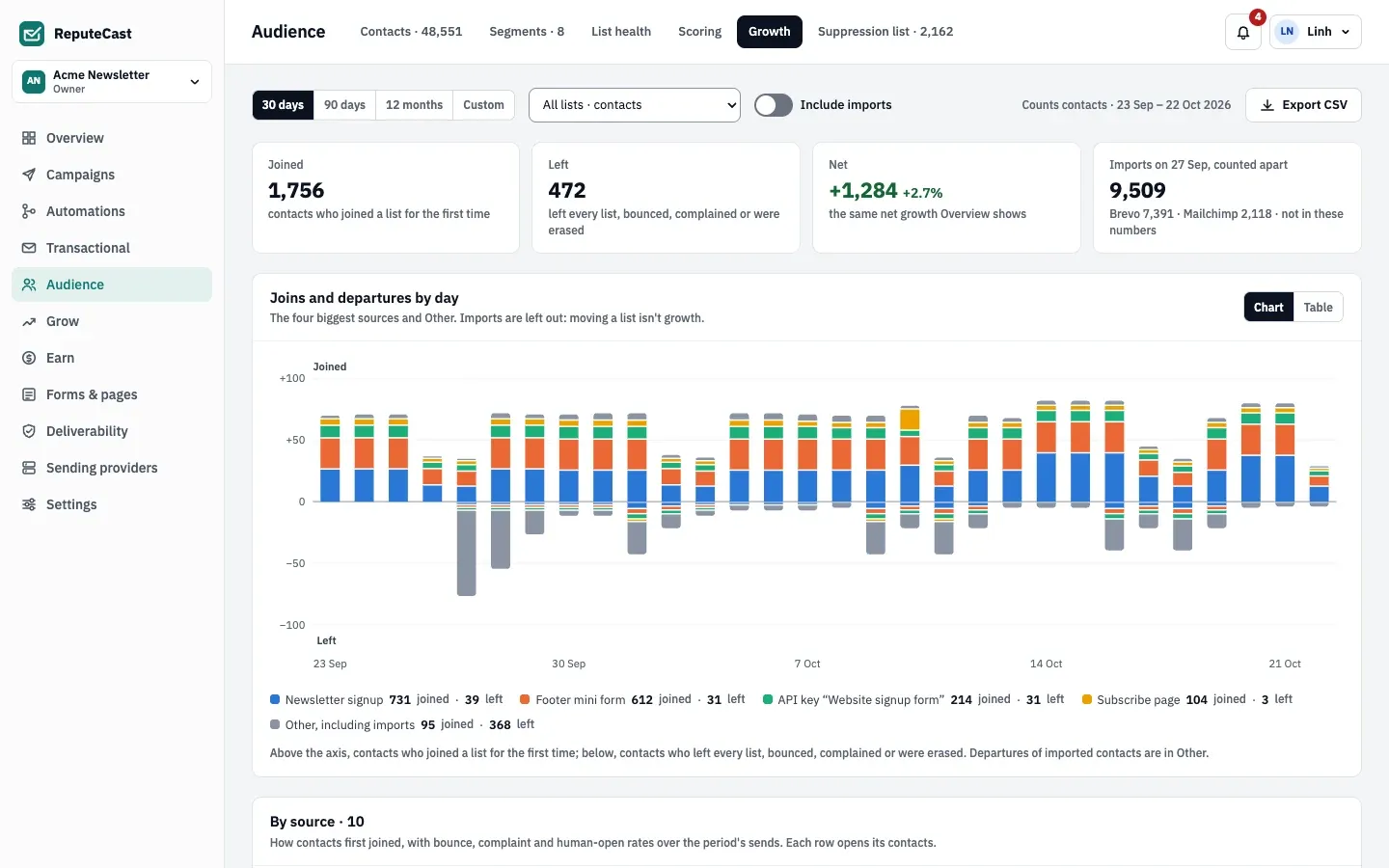
Pick the period (30 days, 90 days, 12 months or Custom, up to 731 days) and the list. With All lists · contacts, the page counts contacts; with one list, it counts that list’s members, each under how they joined that list.
-
Read the tiles. Joined counts contacts who joined a list for the first time; Left counts contacts who left every list, bounced, complained or were erased. Imports are counted apart, because moving a list isn’t growth; turn on Include imports to add them, shown as a marker on the import day.
-
Read By source. Each row is how contacts first joined: a form (embedded, popup or hosted), the subscribe page, an API key, an integration (Zapier, Make, n8n, WordPress), a person in ReputeCast, a referral, a partner or an import. It shows joins, departures, net growth, and bounce, complaint and human-open rates over the period’s sends. Select a row’s contact count to open those contacts.
-
Read Departures by kind, Cohort retention and UTM and referring pages further down (described below).
Quality by source
Section titled “Quality by source”Rates use Broadcast and Automation emails sent to each source’s contacts. Bounces are counted over sent messages; complaints and human opens over delivered ones. Machine opens and bot clicks never count.
- A source is flagged when its bounce or complaint rate is more than twice the workspace’s rate: “Bounces 2.4× the workspace”. A flagged API key gets a note with the likely cause and Open the key.
- With fewer than 50 contacts from a source, or fewer than 100 delivered messages in the period, the rates read Too few to compare.
Cohort retention
Section titled “Cohort retention”Each row is the contacts who first joined in one calendar month (imports left out), with the share still subscribed after 30 and 90 days. A cohort shows “in progress” until every member reaches the mark. Pick a source to compare one source’s cohorts with the rest.
UTM and referring pages
Section titled “UTM and referring pages”The UTM parameters tab groups joins by utm_source / utm_medium / utm_campaign; the Referring pages tab by the
page the visitor came from, stored without its query string. Both list the top five, then “Other”. “(none)” means the
signup page had no UTM parameters; “None (typed or bookmarked)” means there was no referrer; “Not captured” means the
contact joined before capture started. The values are saved with each signup’s consent record, and the first one is
the contact’s first touch.
utm_content and utm_term are stored with the consent record too, but this page and its export don’t show them.
Export the tables
Section titled “Export the tables”Select Export CSV. The CSV holds totals only, no addresses, in sections: sources, departures, UTM combinations, referring pages and cohorts. Each export is in the audit log.
Defaults and limits
Section titled “Defaults and limits”| Setting | Default | How to change |
|---|---|---|
| Cohort retention checkpoints | 30 and 90 days after joining | Fixed |
| Source flagged | Bounce or complaint rate above 2 times the workspace rate | Fixed |
| Too few to compare | Fewer than 50 contacts or 100 delivered messages from the source | Fixed |
Check that it worked
Section titled “Check that it worked”- A test signup through a form, with
?utm_source=testin the page address, appears under its form in By source and undertestin UTM parameters. Joins are attributed within about a minute. - The contact’s profile shows “Joined date · source”.
Troubleshooting
Section titled “Troubleshooting”- A source’s rates read “Too few to compare” → wait for more sends, or pick a longer period.
- All joins show “Not captured” → those contacts joined before UTM capture started, or came from an import, the API or an integration.
- Today’s sends are missing from the quality rates → quality figures are rolled up hourly for days before today.
- Net growth here differs from List health → this page counts contacts once; List health counts list members, so a contact on two lists counts twice there.