
Send SMS campaigns
ReputeCast lets you run SMS marketing self-hosted, through your own account at Twilio, Vonage, Plivo, Telnyx or AWS End User Messaging. Texts are routed by country to a registered sender, go only to people who agreed to texts on that list, wait for quiet hours to end and stop on their own when failures, carrier filtering, opt-outs or your budget pass a limit.
Before you begin
Section titled “Before you begin”- Connecting providers, adding senders and changing routes and rules needs
providers:manage(Owner and Admin). Everyone withproviders:viewcan see them and use the route tester. - Sending or scheduling an SMS campaign needs
campaigns:sendandsms:send. Publishing an automation with an SMS step needsautomations:publishandsms:send. Both send keys are sensitive permissions; without them the composer offers Review & request approval. - Have an account at the SMS provider and at least one sender that is registered for the countries you text (see Senders and registration).
- Contacts need a phone number and SMS consent on the list you send to. Consent for texts is separate from email.
Connect an SMS provider
Section titled “Connect an SMS provider”| Provider | Kind | Event webhooks | Suppression sync | Notes |
|---|---|---|---|---|
| Twilio | Programmable Messaging API | Signed with a webhook shared key ReputeCast creates (X-Twilio-Signature) | From replies and refused texts | Connect with an API key SID and secret, never the auth token. Toll-free, 10DLC and sender IDs outside the US and Canada. |
| Vonage | SMS API | Signed webhooks, HMAC-SHA256 with the account signature secret | From replies and refused texts | Vonage reports no registration status through its API, so sender registrations are set by hand. |
| Plivo | Message API | Plivo V3 signature (HMAC-SHA256 with the auth token and a nonce) | None (keywords arrive as inbound texts) | Connect with the auth ID and auth token. |
| Telnyx | API v2 | Ed25519 signature checked with the account public key, with a timestamp | Read only | Connect with an API key and the account public key. Prices are entered by hand and corrected from each text's cost. |
| AWS End User Messaging | AWS API | Amazon SNS topic, signatures checked against Amazon's certificates | Two-way (opt-out list) | Texts from your own AWS account with a CloudFormation role or IAM keys. Prices are entered by hand. |
-
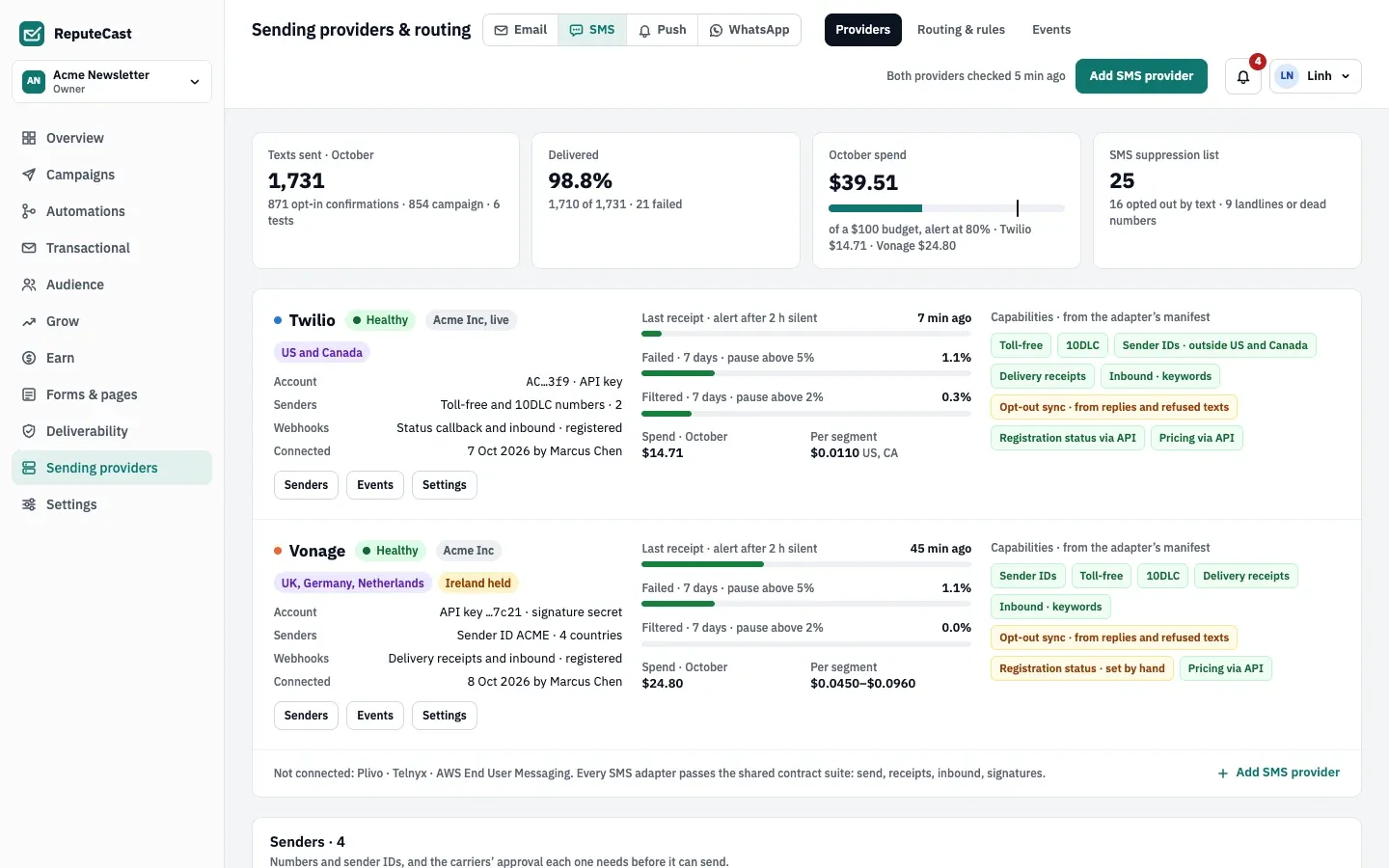
Open Sending providers. Until a second channel is set up, choose Add a channel and pick SMS; after that, switch to Sending providers, then SMS, then Providers and choose Add SMS provider.
-
Connection. Enter the provider’s credentials:
- Twilio: Account SID, an API key SID and its secret (never the auth token), and live or test.
- Vonage: API key, API secret and the signature secret (Settings › API settings › Signed webhooks, with HMAC SHA-256).
- Plivo: auth ID and auth token.
- Telnyx: API key, the account’s public key and, optionally, a messaging profile ID (empty creates one).
- AWS End User Messaging: the region, a role ARN with external ID or access keys, and the opt-out list.
ReputeCast registers its webhook at the provider. If that fails, it shows a webhook address and a signing secret once, to paste in the provider’s console.
-
Senders. Import the provider’s numbers and add sender IDs. Twilio numbers are sorted into toll-free, 10DLC and local for you.
-
Test text. Send “This is a test from ReputeCast.” to your own number, with the brand prefix and opt-out text.
-
Countries. Choose which countries this provider texts, then Finish.
Provider health
Section titled “Provider health”A provider is Degraded when texts went out but no delivery receipt came back for 2 hours, and Down after 3 failed calls in a row; rejected credentials show as Credentials rejected. Registrations are read every hour, prices every day and provider opt-out lists every 15 minutes.
Senders and registration
Section titled “Senders and registration”Carriers only deliver from registered senders. ReputeCast tracks each sender’s registration per country and never texts a country where it isn’t Verified, Approved or Allowed without registration: those texts are held.
| Sender | Where it works | Registration |
|---|---|---|
| Toll-free number | The countries listed on the sender (US and Canada) | Toll-free verification |
| 10DLC number | US only | An approved brand and campaign |
| Local or mobile number | Its own country | Allowed without registration |
| Sender ID (up to 11 letters and digits) | Country by country; not in the US or Canada | Allowed in many European countries, registered elsewhere |
Registration statuses are Not registered, Pending, Verified, Approved, Rejected, Allowed without registration and Not supported. Vonage reports no registration status through its API, so you set those by hand (with the date, and a reason when rejected). Approving a sender releases the texts held for it.
Route by country
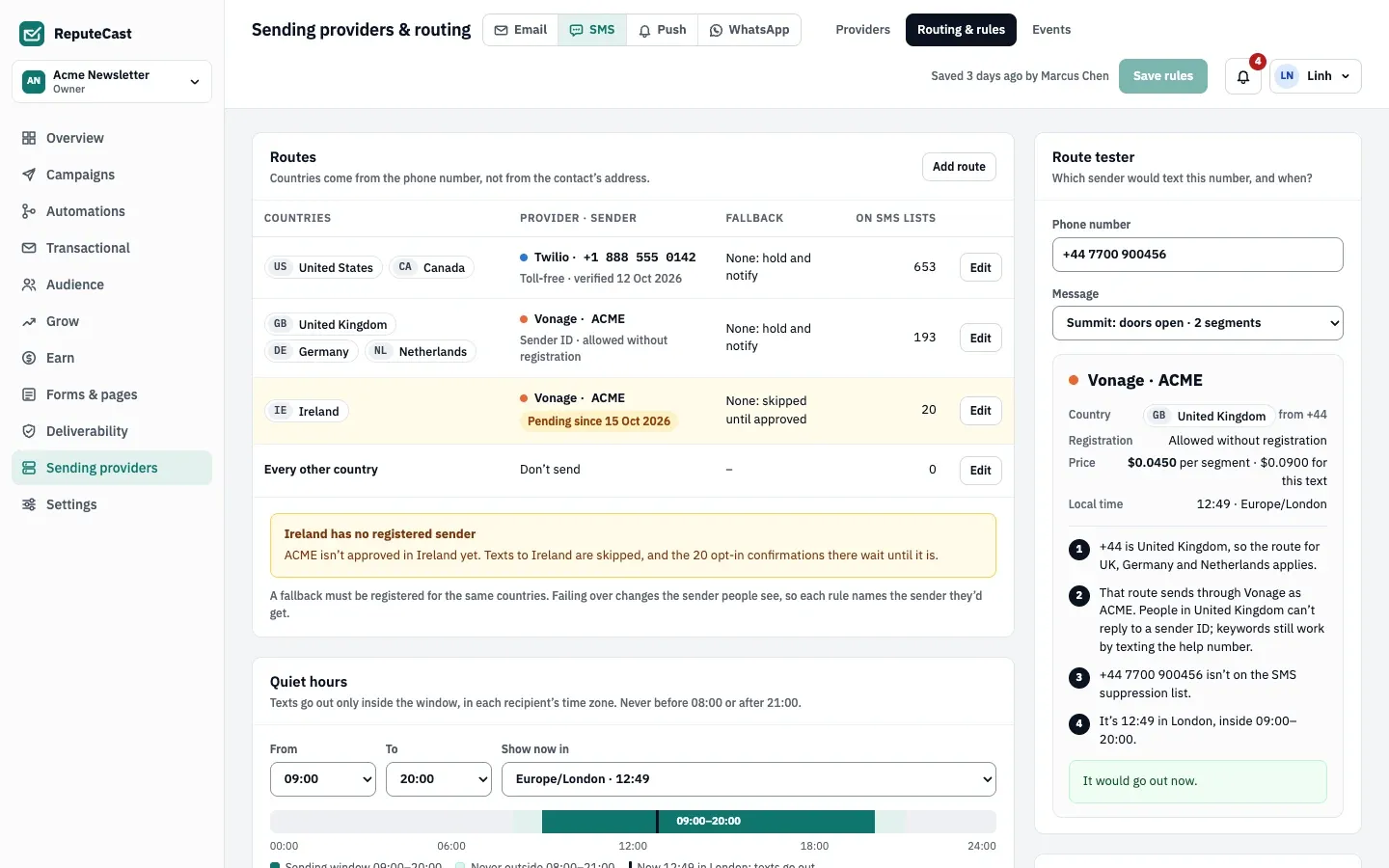
Section titled “Route by country”On Sending providers, then SMS, then Routing & rules, each country belongs to one route with a sender and an optional fallback. The country comes from the phone number, not the contact’s address.
- Every other country is Don’t send by default, so a number in a country you didn’t plan for is skipped. You can send them through a chosen route instead.
- A fallback takes over when the primary provider is down or its credentials are rejected. It must be registered for the same countries; it doesn’t cover a sender that isn’t registered.
- The Route tester shows, for a phone number, the provider, sender, registration, price per segment, local time and whether quiet hours would hold the text.
Consent and keywords
Section titled “Consent and keywords”SMS consent is kept per list, apart from email: STOP never unsubscribes someone from email, and an email unsubscribe never stops texts. Each change keeps its evidence: the phone number, where it was given (a form, the preference center, an import, the API or your team), the exact consent text and version, the keyword, IP address and time. Read Lists, consent and double opt-in.
- Recording consent by hand (Audience › a contact › Record SMS consent, with
subscribers:edit) needs where they gave it, the text they agreed to and when. - Imports bring SMS consent only with date, source and consent-text columns; otherwise the number is imported without consent.
- Opt-in confirmation is on: the first text on a list confirms the signup. Ask them to reply YES first turns it into a double opt-in.
- Text message terms: ReputeCast publishes a terms page carriers ask for; edit it under Forms & pages › Text message terms.
Keywords work when they are the whole reply, in any case:
| Keyword | Words | What happens |
|---|---|---|
| Opt-out | STOP, STOPALL, UNSUBSCRIBE, CANCEL, END, QUIT, OPTOUT, REVOKE | Consent is withdrawn on every list for that number, the number is suppressed, and one reply is sent |
| Opt-in | START, UNSTOP | The suppression is lifted and exactly the consents STOP removed come back |
| Help | HELP, INFO | The help reply is sent |
You can add up to 30 words per list and edit the replies (up to 640 characters each); STOP and HELP can’t be removed. Keyword replies go at once, even in quiet hours. Any other reply appears on the contact’s timeline and in the campaign report; there is no two-way inbox.
A number that opted out by text stays suppressed until the person texts START; your team can’t remove it. Numbers are also suppressed automatically when a text fails as a landline, invalid or not-in-service number, when the provider’s opt-out list has them, or after 3 carrier-filtered texts in 30 days. Read The suppression list.
Quiet hours
Section titled “Quiet hours”Texts go only between 09:00 and 20:00 in each recipient’s local time. You can narrow the window under Quiet hours, but never beyond 08:00–21:00. The time zone is the contact’s time zone field, or it comes from the phone number (the area code, else the country’s main zone).
Texts outside the window wait for it to open; they aren’t dropped. Push notifications and WhatsApp messages use the same window.
Write and send a campaign
Section titled “Write and send a campaign”-
In Campaigns, start a new campaign and choose Text message (SMS). The card appears once an SMS provider is connected.
-
Write the text. The composer counts characters and segments, including the brand prefix and the opt-out text (“Reply STOP to opt out” by default), which are added to every campaign text. Personalize inserts tokens such as
{{ first_name | default: "there" }}; read Personalize emails with Liquid.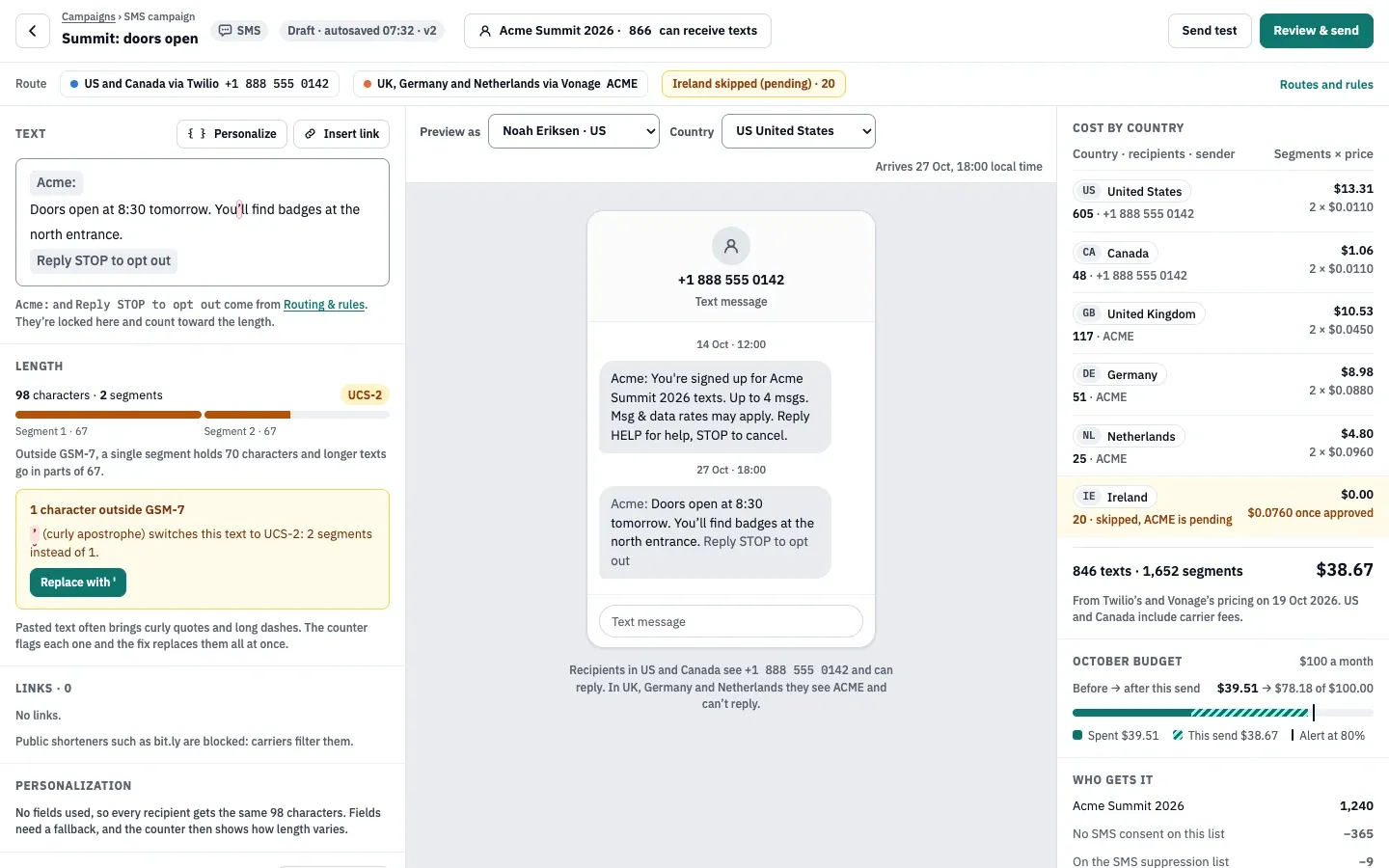
-
Mind the segments. A text in plain GSM-7 characters fits 160 characters in one segment (153 per part when longer); a single character outside GSM-7, such as a curly quote or an emoji, switches the whole text to Unicode: 70 characters, 67 per part. Replace them all swaps curly quotes, dashes and ellipses for plain ones. Review warns above 3 segments.
-
Links are shortened on your own short-link domain, set under Message rules (a CNAME to your instance, for example
go.acme.io). Each recipient gets their own 6-character code, and clicks getutm_source=sms,utm_medium=smsandutm_campaigntags. Public shorteners such as bit.ly or tinyurl.com block the send, and a link without a verified short-link domain blocks it too. -
Send test texts your test numbers. Then choose Review & send. Review checks the audience, senders, registration and routes, consent, suppressions, quiet hours, time zones, the opt-out text, the brand prefix, links, length and budget.
-
Pick the schedule: Now, At one time for everyone or At a time in each recipient’s time zone. The cost estimate uses each provider’s pricing per country and each person’s own text length. For more than 1,000 recipients or an estimated cost above $100, you type the recipient count to confirm.
Budget and auto-pause
Section titled “Budget and auto-pause”Under Budget and guards you can set a monthly budget in US dollars. Members with
providers:manage are alerted at the alert level (80% by default) and at 100%. At 100%, Review blocks new sends, a
running campaign pauses and automation texts are held until you raise the budget.
A running campaign also pauses itself when, after its first 50 texts, more than 5% fail, more than 2% are filtered by
carriers or more than 3% of recipients opt out. You can change the thresholds for the workspace or per campaign in
Review & send. Nothing already sent is recalled; resuming needs campaigns:send and sms:send.
| Setting | Default | How to change |
|---|---|---|
| Quiet hours (recipient's local time) | Sends only 09:00–20:00 | Sending providers › SMS › Routing & rules; can't go beyond 08:00–21:00 |
| Characters per segment | GSM-7: 160, or 153 per part of a longer text. Unicode (UCS-2): 70, or 67 per part | Fixed |
| Alphanumeric sender ID | Up to 11 characters; not supported in the US and Canada | Fixed |
| Short links in texts work for | 12 months | Fixed |
| Monthly budget | None; when set, an alert at 80% and sending holds at 100% | Sending providers › SMS › Routing & rules › Budget and guards (alert 1–100%) |
| Auto-pause thresholds (counted after 50 texts) | Failed above 5%, filtered by carriers above 2%, opt-outs above 3% | Sending providers › SMS › Routing & rules, 0.1–100%; per campaign in Review & send |
| Sends that need the recipient count typed to confirm | More than 1,000 recipients or a cost above $100 | Fixed |
| Text content kept | 30 days | Sending providers › SMS › Routing & rules › Retention; don't keep, 7, 30, 60 or 90 days |
| Brand prefix and opt-out text | Prefix up to 20 characters; opt-out text up to 60, "Reply STOP to opt out" by default | Sending providers › SMS › Routing & rules › Message rules |
Read the report
Section titled “Read the report”The SMS report shows texts sent, delivered and failed (with reasons), clicks (link previews counted as machines, never people), opt-outs and the cost, by sender and by country, plus delivery over time and replies. Export CSV gives the same per country and sender.
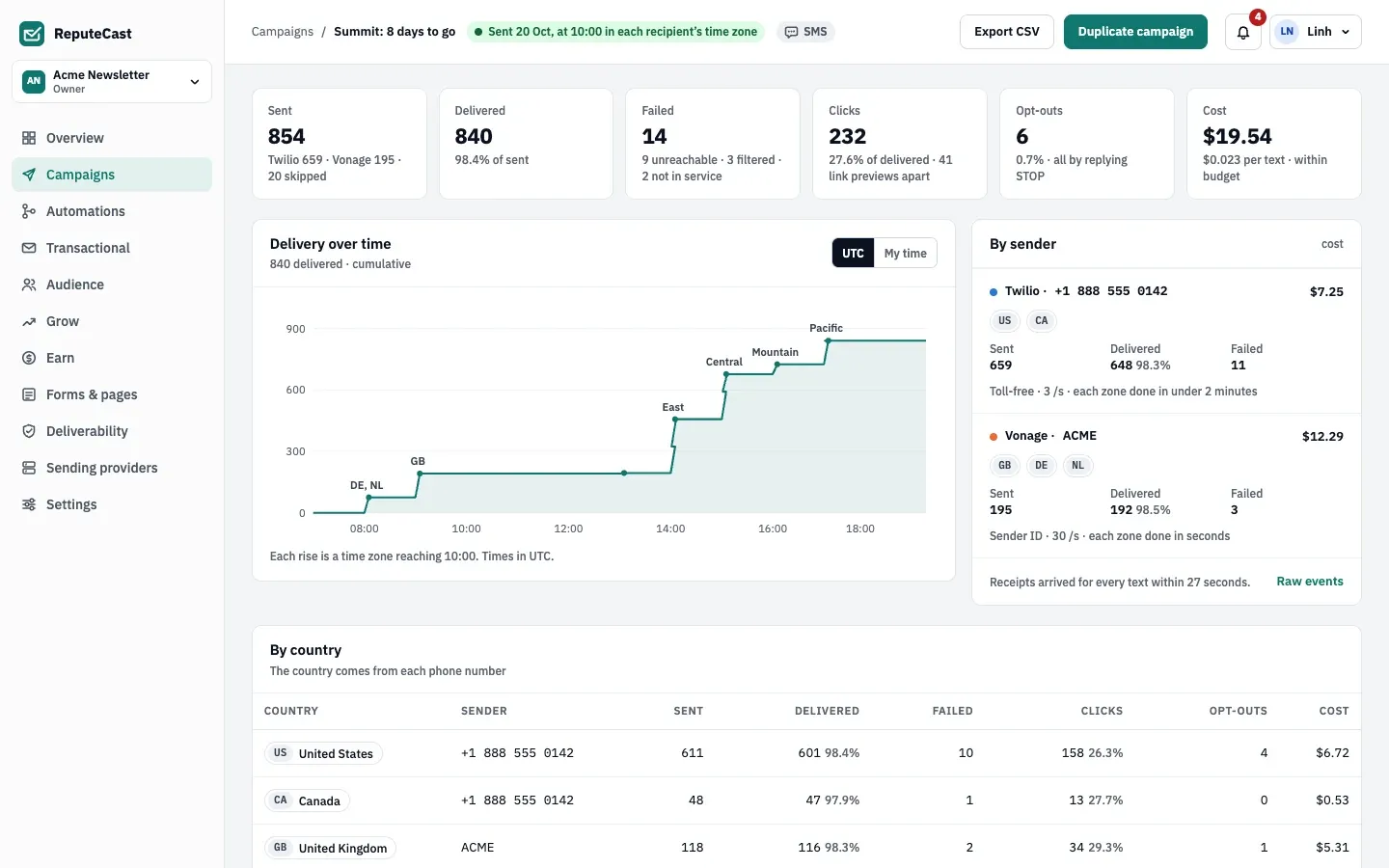
Text content is kept for 30 days by default (none, 7, 30, 60 or 90 days under Retention); delivery events and clicks are kept for 90 days.
Troubleshooting
Section titled “Troubleshooting”- Texts to a country are held: the sender isn’t registered there (status Not registered, Pending, Rejected or Not supported). Register it, or route the country through a sender that may text it.
- Numbers in a country are skipped: no route covers it and every other country is set to Don’t send.
- Review blocks on links: set and verify the short-link domain, or replace a public shortener with the full URL.
- The campaign paused itself: open the report to see which threshold it passed, fix the cause, then resume or resume with changes.
- A provider shows Degraded: receipts aren’t arriving. Check the webhook on the provider’s side and the Sending providers, then SMS, then Events tab.