
Recommend other newsletters
Newsletter recommendations show other newsletters to your readers right after they confirm their subscription, and in your emails. A recommendation is either a plain link to any newsletter’s subscribe page, or a partner link to a newsletter on another ReputeCast instance, where readers subscribe with one click and confirm through the partner’s own double opt-in.
Before you begin
Section titled “Before you begin”- Adding link recommendations, ordering them and choosing where they show needs the
grow:editpermission. Owners, Admins and Editors have it. - Partner links need
grow:connect, a sensitive permission that only Owners and Admins have. Only people can use either permission; API keys and agents can’t change recommendations. - For partner links, both newsletters run ReputeCast, and both instances have a public URL set by an instance admin.
Choose link or partner
Section titled “Choose link or partner”- Link: any newsletter’s subscribe page. Readers subscribe on the other site, so you see clicks only.
- Partner on ReputeCast: readers subscribe from your pages with one click, and the partner emails them to confirm. You see requests and confirmations; neither side sees the other’s readers.
Add a link
Section titled “Add a link”- Open Grow, then Recommendations and select Add recommendation.
- Select No, add a link.
- Enter the newsletter’s subscribe page (an
https://address; private and loopback addresses are refused) and select Fill in from the page to read its name, description and logo. - Check the name and the description for readers (up to 120 characters), and choose where it shows: the confirmation page, the Recommendations block in emails, or both.
- Select Add recommendation. It shows to readers from now on.
Connect a partner newsletter
Section titled “Connect a partner newsletter”The newsletter you recommend creates a partner code, and you paste it.
- The partner opens Grow, then Recommendations, selects Let a newsletter recommend you, enters who the code is for, the list it offers and a daily limit (50 by default), and selects Create partner code. The code is shown once, works once and expires after 7 days. The partner sends it to you.
- You select Add recommendation, then Yes, I have a partner code, and paste the code.
- ReputeCast asks the partner’s instance for its profile over HTTPS and shows its name, description, list and daily limit. Select Connect.
During the connection, the two instances agree on a signing secret over HTTPS. It is stored encrypted on both sides and never shown.
How a partner signup works
Section titled “How a partner signup works”- A reader presses Subscribe on your confirmation page or in the hosted page an email links to.
- Your instance sends the partner a signed subscribe request that carries only the reader’s email address and your newsletter’s name as the source.
- The partner adds the address as pending and sends its own confirmation email on its System stream. The reader is subscribed only after confirming. An address already on the partner’s list gets no email, and the answer is the same either way, so you never learn who already reads it.
- The partner reports each confirmation back as a signed notice that names the request, never the reader. Your instance keeps counts only.
Requests are signed with HMAC-SHA256 over a timestamp, the method, the path and the body; a timestamp more than 5 minutes off is refused. An unanswered request is retried for 24 hours. When the partner’s daily limit is reached, the recommendation is hidden until 00:00 UTC. The partner request log keeps 90 days of requests and never shows addresses.
| Setting | Default | How to change |
|---|---|---|
| Partner code | Single use, valid 7 days | Fixed |
| Clock difference allowed on signed partner requests | 5 minutes | Fixed |
| Subscribe requests per partner per day | 50, resetting at 00:00 UTC | Grow › Recommendations, 1–100,000 |
| Unanswered subscribe request retried for | 24 hours | Fixed |
| Recommendations on the confirmation page | Up to 3 | Fixed |
| Partner request log kept | 90 days | Fixed |
Where recommendations show
Section titled “Where recommendations show”- The confirmation page: under “While you’re here: newsletters … recommends”, up to 3 recommendations in your order. Turn it off with Show recommendations on the confirmation page. Partner cards have a Subscribe button and say the reader’s email address goes to that newsletter; link cards open the other site.
- Emails: add the Recommendations block from the composer’s Grow blocks. Its buttons open a hosted page where the reader confirms, so link scanners can’t subscribe anyone. That personal page works for 30 days. The block hides when nothing can show.
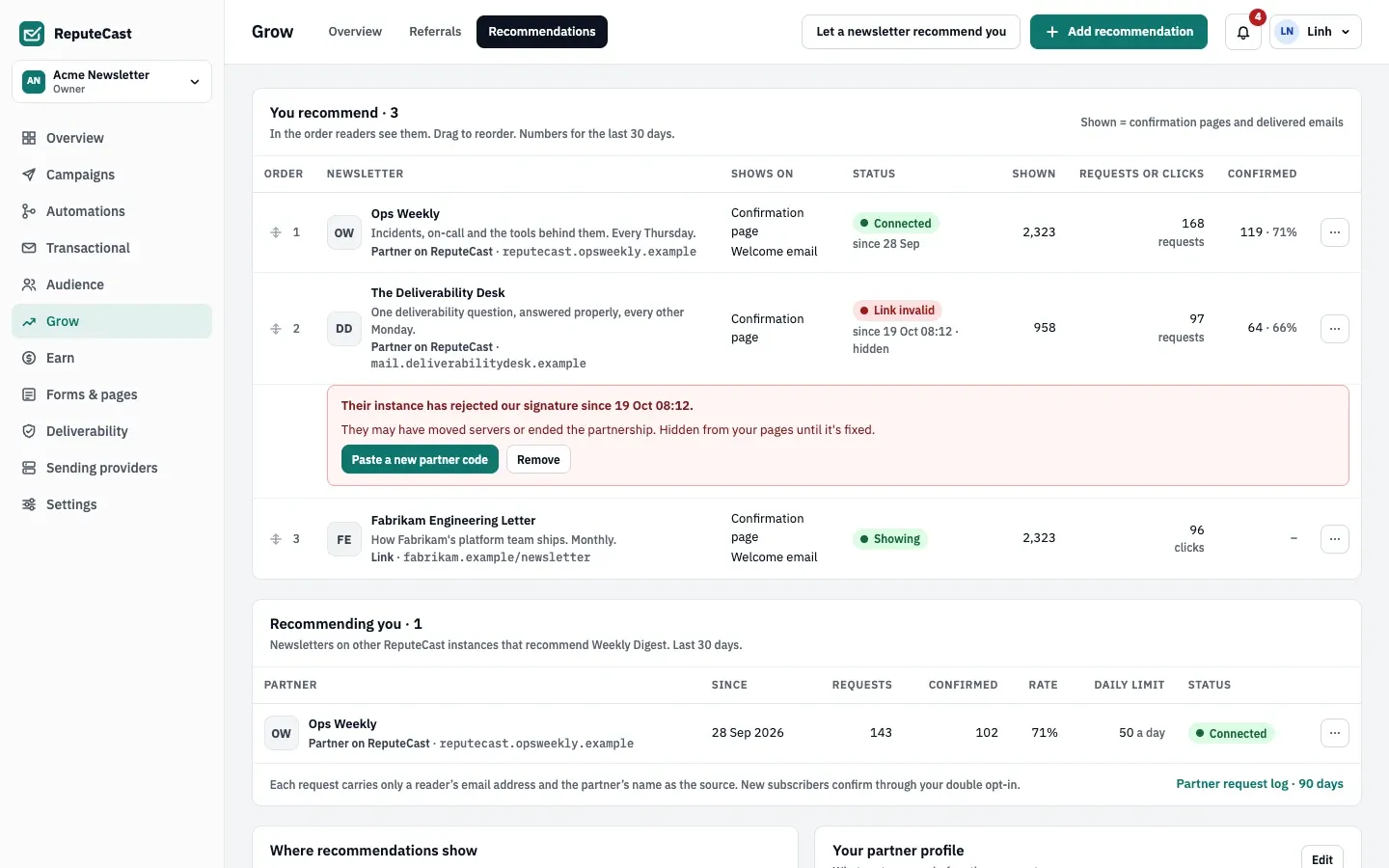
Shown counts confirmation pages and delivered emails, not opens, because machine opens would inflate it. See read campaign reports for how ReputeCast tells human and machine opens apart.
Manage partner links
Section titled “Manage partner links”From a partner recommendation’s menu, you can Pause partner link, resume it, or End partnership. Ending can’t be undone: a new partnership needs a new partner code. The partner can Change limit for the link it gave you. Removing a partner recommendation also ends its link.
A partner link shows Connected while it works. Other statuses are Paused, Paused by partner, Daily limit reached,
Unreachable, Link invalid and Ended. People with grow:connect get a notification after a partner has been
unreachable for 30 minutes.
Check that it worked
Section titled “Check that it worked”- Subscribe to your own newsletter with an address you own and confirm. The confirmation page lists your recommendations.
- Press Subscribe on a partner card. The partner’s confirmation email arrives, naming your newsletter as the source.
- In Recommendations, the recommendation counts one request, then one confirmation.
Troubleshooting
Section titled “Troubleshooting”- “Code expired” or “Code already used”. Ask the partner for a new partner code.
- “Private address refused”. The partner code points at a private or loopback address. Ask the partner to set their instance’s public URL to an address reachable over the internet.
- Link invalid. The partner’s instance rejects your signature, for example after it moved servers or ended the partnership. Paste a new partner code from them, or remove the recommendation.
- Daily limit reached. The partner accepts no more requests from you until 00:00 UTC. They can raise the limit.