
Warm up a new provider or IP
A new dedicated IP, a new sending provider or your own Postal server has no sending history, so mailbox providers treat a sudden flood of mail from it with suspicion. A warm-up plan gives it an IP warm-up schedule: a daily cap that rises over a few weeks, mail to your most engaged contacts first, and an automatic slowdown when bounces or complaints rise.
Before you begin
Section titled “Before you begin”- Connect the provider. Read Connect a sending provider.
- For its share of Broadcasts to rise on schedule, put it in a weighted split on the Broadcasts route next to a provider that is already warm, for example 90% Amazon SES and 10% Postal. You set this up on the connect wizard’s Streams step (role Weighted split). Read Route mail across providers.
- You need the
providers:managepermission. Withproviders:viewyou can follow a plan. - Engagement tiers come from list health: Active, Cooling, At risk and Sunset.
Start a plan
Section titled “Start a plan”-
Open Sending providers, then Warm-up and choose New warm-up plan.
-
Pick the Provider. Enter its Dedicated IP if it has one; leave it empty to warm the provider’s shared pool for your domain.
-
Choose Start warm-up. The provider’s status changes to Warming up · day 1 of N, its first day’s cap is 200 emails, and its Broadcasts share starts at 10%. Each provider can have one plan at a time.
-
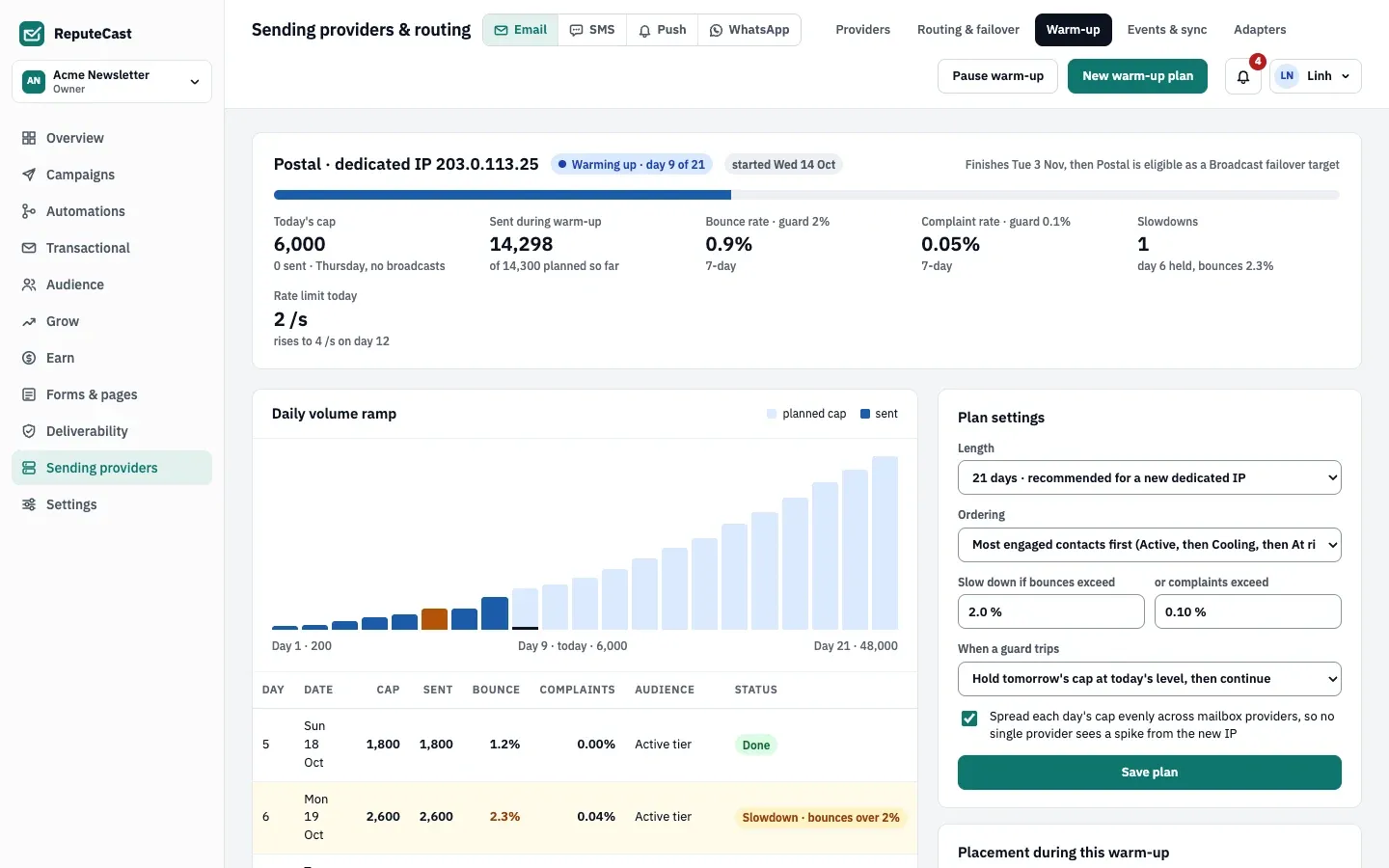
Adjust the Plan settings if you need to, then choose Save plan. Changes apply from tomorrow’s cap.
- Length: 14 days (fast), 21 days (recommended for a new dedicated IP) or 30 days (cautious). A new length rebuilds the schedule between the same first and last volumes; days already sent keep their results.
- Ordering: Most engaged contacts first (Active, then Cooling, then At risk), or Random sample, which mails every engagement tier from the first day.
- Slow down if bounces exceed a bounce rate, or complaints exceed a complaint rate.
- When a guard trips: Hold tomorrow's cap at today's level, then continue, Step back one day or Pause until I resume.
How the schedule works
Section titled “How the schedule works”- The ramp. Day 1 is 200 emails. The cap grows by the same factor each day until the last day reaches the target: your largest campaign audience so far, or 48,000 when the workspace hasn’t sent a campaign yet. The day’s rate limit spreads the cap over about an hour (the cap divided by 3,000, per second), never goes below 1 email per second and never exceeds the provider’s own maximum rate.
- Who gets mail first. With engaged-first ordering, the first quarter of the days mails only Active contacts, Cooling contacts join until the halfway point, At risk contacts join after that, and the last day mails every tier.
- What happens to the rest. For Broadcasts, a contact the plan doesn’t allow today (the wrong tier, over today’s cap, or the plan is paused) goes through the largest other share of the same route that isn’t warming up, or else the route’s fallback. Nobody is skipped because of the warm-up: if the route has no other provider, the mail still goes through the warming provider.
- The Broadcast share. If the provider is in a Broadcasts weighted split with another provider, its share rises from 10% to 15%, 25% and finally 40% over the plan; the share comes from the largest other provider in the split.
- The daily check. ReputeCast checks every running plan each hour. When a day ends (in the workspace’s time zone), it records what was sent, the bounce rate (bounces per message sent) and the complaint rate (complaints per message delivered). If either is over its guard, it holds the next day’s cap, steps back one day or pauses the plan, as you chose, and writes it to the Warm-up log.
- The end. After the last day, the plan is done, the provider’s status returns to Healthy and it can take Broadcasts failover under the warmed-up-only policy.
Read the plan
Section titled “Read the plan”The headline shows the day (“day 9 of 21”), when the plan finishes, today’s cap and what was sent today, everything sent during the warm-up against what was planned, the 7-day bounce and complaint rates beside their guards, the slowdowns so far and today’s rate limit. The Daily volume ramp chart and the table under it show each day’s cap, what was sent, its bounce and complaint rates, the tiers it mailed and its status: Done, Slowdown, Today or Planned.
To stop the ramp for a while, choose Pause warm-up. While the plan is paused, its Broadcast share goes to the other providers of the route, and its cap stays where it is until you choose Resume warm-up. The days keep counting while it’s paused, so the ramp continues from the day you resume on.
Defaults and limits
Section titled “Defaults and limits”| Setting | Default | How to change |
|---|---|---|
| Warm-up plan length | 21 days | Sending providers › Warm-up › Plan settings; 14, 21 or 30 days |
| Day 1 volume | 200 emails, growing each day to your largest Broadcast audience | API targetVolume sets the final volume |
| Slow down when a day's bounce rate exceeds | 2.0% | Warm-up › Plan settings, 0.5–10% |
| Slow down when a day's complaint rate exceeds | 0.1% | Warm-up › Plan settings, 0.01–1% |
| When a guard trips | Tomorrow's volume stays at today's level | Warm-up › Plan settings; hold, step back one day, or pause |
| Who gets mail first | Most engaged first: Active only for the first quarter of the days, Cooling added until the halfway point, At risk added until the last day, every tier on the last day | Warm-up › Plan settings › Ordering |
| Broadcast share of a warming-up provider | Rises from 10% to 15%, 25% and 40% over the plan | Automatic when the Broadcast route splits across two or more providers |
Check that it worked
Section titled “Check that it worked”- Sending providers, then Providers shows the provider as Warming up · day N of M, with today’s warm-up cap.
- Sending providers, then Routing & failover shows the planned share increases under the weighted split.
- After the first full day, the warm-up log has a “Day 1 complete” entry with what was sent and the bounce rate.
Troubleshooting
Section titled “Troubleshooting”- “Every connected provider already has a warm-up plan”: each provider has one plan at a time. Change the running plan’s settings instead.
- The Broadcast share doesn’t rise: the provider must be in the Broadcasts weighted split with at least one other provider whose share can give up the difference. A share you raised by hand above the planned one stays as it is.
- A slowdown on the first days: bounces on a new IP usually mean old or unverified addresses. Check list health and the bounce codes in the event log.
- The plan paused itself: the guard tripped and the plan is set to pause until you resume. Read the warm-up log for the day and the mailbox provider with most bounces, fix the cause, then choose Resume warm-up.