
Run a referral program
A newsletter referral program gives every confirmed subscriber of a list a personal link to share. A referral counts only after the friend confirms their address and a hold period passes, and referrers earn rewards at the milestones you set. Each list can have one referral program.
Before you begin
Section titled “Before you begin”- Setting up and changing the program needs the
grow:editpermission; deciding on held referrals and handling rewards needsgrow:review. Owners, Admins and Editors have both. Only people can use them, not API keys or agents. - The list needs a verified sender for its milestone emails. See add sending domains and senders.
- Stripe coupon rewards need Stripe and the
earn:editpermission. See connect Stripe.
Set up the program
Section titled “Set up the program”- Open Grow, then Referrals and select Start a referral program. A guide with five steps opens; Turn on the program is its last button, and you can save and finish later.
- List: pick the list. People who sign up through a referral link join it. The list can’t change once the program has been on.
- Milestones and rewards: add a milestone for each number of counted referrals (for example 1, 3 and 10) with its reward. See rewards.
- Counting rules: choose the hold period and the rules that hold referrals for review. See how referrals count.
- Emails and pages: write each milestone’s email, or choose to send none and use an automation instead.
- Turn on: the guide checks that a milestone exists, that every milestone has an email or “No email”, that download files are uploaded, that Stripe is connected for coupon rewards and that the sender is verified. Then select Turn on the program.
When the program turns on, every confirmed subscriber of the list gets a link. People who confirm later get theirs when they confirm, and contacts added by import or the API get theirs within a minute.
Share links
Section titled “Share links”Each subscriber’s link looks like https://news.acme.io/join/K7Q2MX: six characters without look-alikes (no 0, O,
1, I or L). It opens an invite page with the referrer’s first name, if the referrer allows it, and a signup form for
the list. Forms and the hosted subscribe page also accept ?ref=K7Q2MX, and ?via= records the channel (copy,
email, x, linkedin, whatsapp or other).
Signups through a referral link always confirm by email, even when the form doesn’t use double opt-in. The first link a person used wins. The link works only while the program is on, the link isn’t paused and the referrer is still subscribed; otherwise the visitor sees the normal subscribe page and nothing counts.
How referrals count
Section titled “How referrals count”A referral waits for the friend to confirm, then for the hold period (7 days by default; 0, 3, 7, 14 or 30). It counts when the hold ends and the friend is still on the list. A counted referral never goes back, even if the friend leaves later.
These referrals never count:
- Self-referral: the referrer’s own address, including plus-tags and Gmail dots.
- Already on the list: the address is, or ever was, on the list.
- Never confirmed: no confirmation within 7 days.
You can turn these off in Settings, but they are on by default:
- Same IP address as the referrer, used by the referrer in the last 30 days.
- Disposable domain.
- Left during the hold: unsubscribed, hard-bounced or complained before the hold ended.
These hold referrals for review instead of counting them:
- Burst: more than 5 confirmed referrals from one referrer within an hour.
- Shared IP address: 3 or more referrals from one IP address within 24 hours.
- Numbered addresses: addresses that differ only by a number, such as
ben.t01@andben.t02@.
| Setting | Default | How to change |
|---|---|---|
| Hold before a referral counts | 7 days after confirmation | Grow › Referrals › Settings; 0, 3, 7, 14 or 30 days |
| Review a burst of referrals | More than 5 confirmed from one referrer within an hour | Grow › Referrals › Settings, 2–100 |
| Review signups from one IP address | 3 or more within 24 hours | Grow › Referrals › Settings, 2–1,000 |
| Unconfirmed referral stops counting after | 7 days | Fixed |
| Signup IP addresses kept | 90 days, then shortened to their network | Fixed |
| Download reward | PDF, ZIP or image up to 100 MB; links work for 7 days | Fixed |
| Low reward codes alert | Under 20 codes, or under 2 weeks at the current pace | Reward editor › Alert threshold, 0–100,000 |
| Reward webhook retries | 8 attempts over about 6 hours | Fixed; failed rewards can be retried by hand |
| Public leaderboard | Off; top 10 when on | Grow › Referrals › Settings; 5, 10 or 25 rows |
| Referrer hub link works for | 60 days | Fixed; Email me my link sends a new one |
Review held referrals
Section titled “Review held referrals”- Open Grow, then Referrals, then Review. Held referrals are grouped per referrer, with the signal that held them and whether anyone opened or clicked since confirming.
- Select referrals and choose Count, Don’t count or Don’t count and pause the link. The review suggests one, with its reasons. An optional note goes to the audit log.
- You have 10 seconds to undo, before any reward goes out. After Count, whatever is left of the hold still applies.
People with grow:review get a notification when the queue goes from empty to waiting, then at most once a day.
Addresses and IP addresses show only to people who also have subscribers:view. To stop a referrer’s link without
deciding on each referral, use Pause link in
Referrers: visitors then see the normal subscribe page, without being told why.
Rewards
Section titled “Rewards”A referrer gets each milestone’s reward once, in order; someone who passes two milestones at once gets both.
| Reward | How it reaches the referrer |
|---|---|
| Download link | A PDF, ZIP or image up to 100 MB, or an https:// link. Download links expire after 7 days; the hub makes new ones. |
| Code from a list | One code per reward from a list you upload (up to 100,000 at a time). You get an alert before the codes run out. |
| Manual fulfillment | Anything you send by hand. It waits under To fulfill until someone marks it fulfilled; it can ask for a shipping address. |
| Stripe coupon | Free paid access through a single-use Stripe promotion code, from an offer of the kind Referral reward. |
| Webhook | ReputeCast posts a signed referral.milestone_reached event, and your system creates the reward. |
A webhook reward needs an https:// endpoint that answers 2xx. It can answer with {"code": "…", "url": "https://…"},
which the milestone email and the hub then show. Failed calls are retried 8 times over about 6 hours, then the
reward shows Failed with a Retry button. See receive webhooks for the signature and
webhook events for the referral.* events.
Milestone emails and automations
Section titled “Milestone emails and automations”Each milestone can send its own email when a referrer reaches it. Milestone emails go out on the Automations stream, so the usual suppression rules apply. They come from the program’s sender (the Automations default sender until you change it in Settings) and open in the composer with the Reward and Referral blocks.
To do more, use the automation trigger Reached a milestone. It starts once per contact per milestone, whether or not the milestone sends its own email. See triggers and steps.
What subscribers see
Section titled “What subscribers see”- The Referral block: add it from the composer’s Grow blocks to show each reader their link and progress, in one of three layouts: Single line, Card with progress or Card with next rewards. It hides for readers who aren’t on the program’s list, while the program is off, and in the archive.
- Liquid tokens: for your own text, such as
{{ referral.link }},{{ referral.count }}or{{ referral.to_next }}. They print nothing for readers outside the program, so add a fallback with| default:. See personalize emails with Liquid. - The referral hub: a private page (“Your referrals”) with the reader’s link, progress, rewards and referrals (numbers and dates only). Its link works for 60 days; an expired link offers “Email me my link”. The hub is never cached or listed by search engines.
- The leaderboard: off by default. When on,
/leaderboardshows the top 10 referrers (or 5 or 25) this month or all time, updated hourly. Names show as “Sam R.” only for readers who opt in on their hub; everyone else is “A reader”. - The preference center shows an “Invite friends” section with the reader’s progress.
Check that it worked
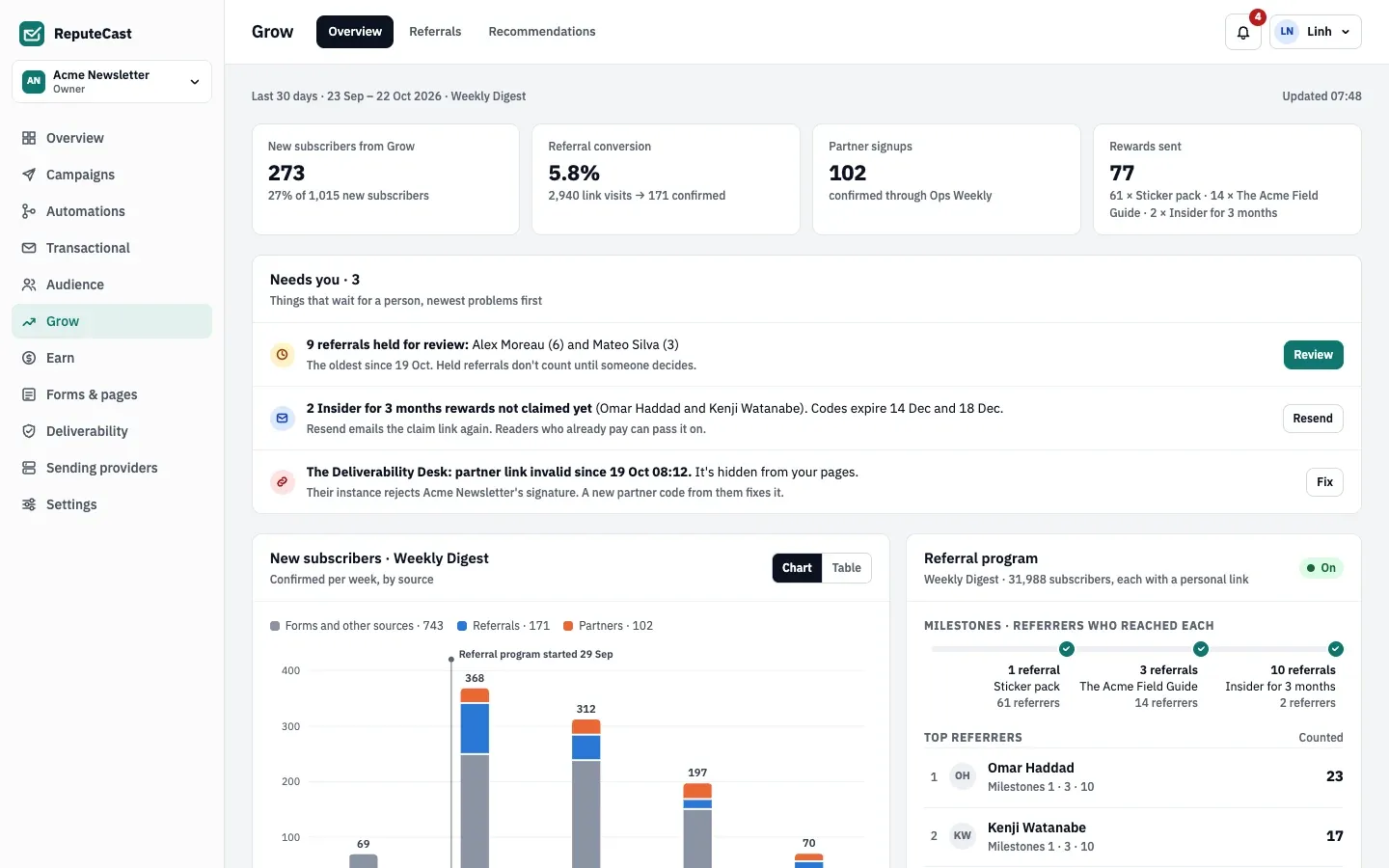
Section titled “Check that it worked”- In Grow, then Overview, the Referral program tile shows the program as on.
- Open your own hub from a test contact’s milestone email or Referral block, copy the link and sign up with another address you own from a different network.
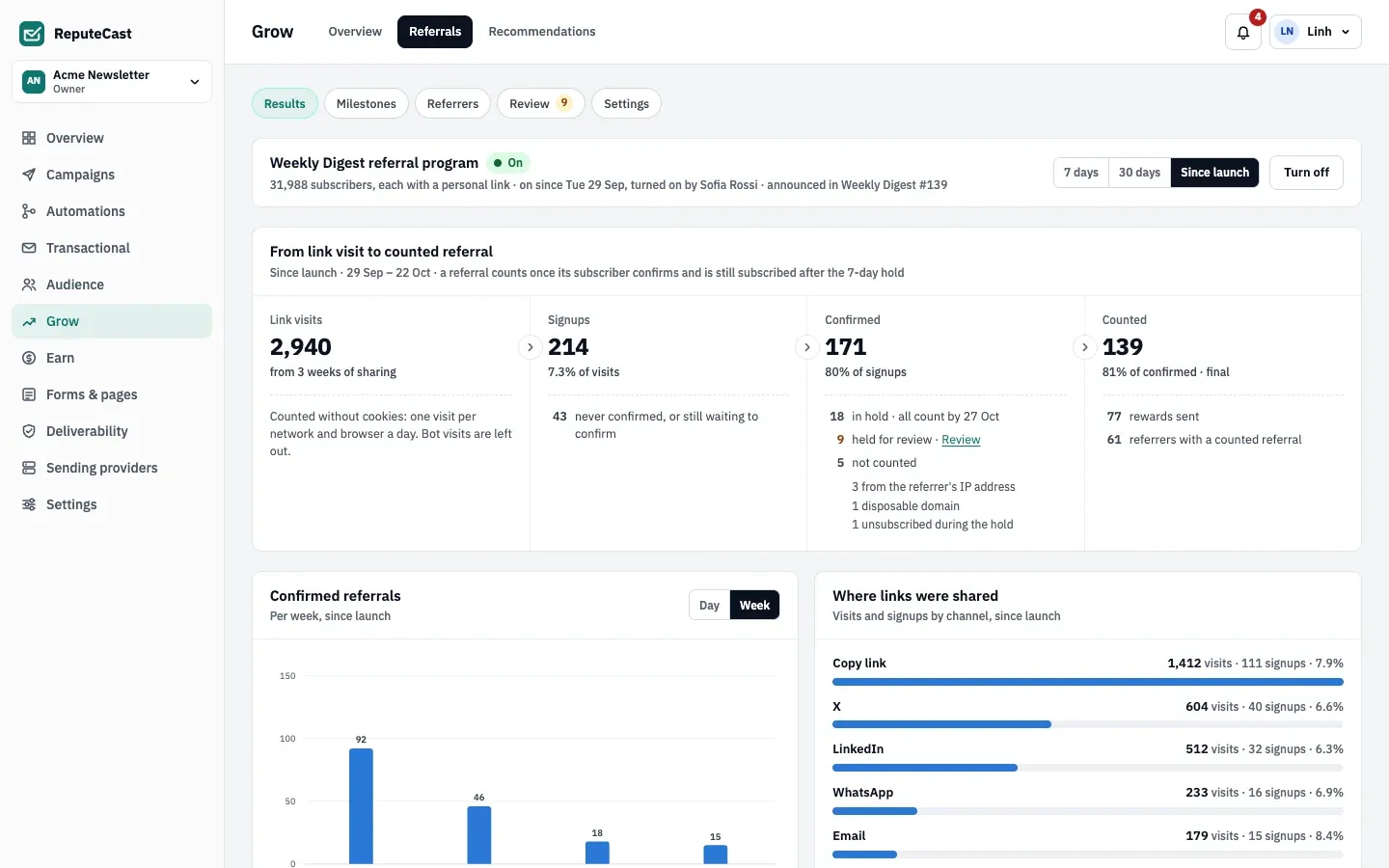
- Confirm the signup. In Results, the referral shows as waiting for the hold to end.
Troubleshooting
Section titled “Troubleshooting”- A referral didn’t count. Results gives the reason for every referral that didn’t count, such as “self-referral” or “never confirmed”. Referrers see a plainer version on their hub.
- Referrals wait for review. The burst, shared IP or numbered-address rule matched. Decide in Review, or raise the burst or shared IP threshold in Settings.
- A Code from a list reward shows Waiting for codes. The list ran out. Upload more codes: waiting rewards go out as soon as codes are added.
- The Referral block doesn’t show in a test. The test contact isn’t on the program’s list, or the program is off.