
Verify email addresses
Connect an email verification service with your own account to find addresses that can’t receive mail before they bounce. ReputeCast sends each address to the service, then suppresses the invalid ones and tags the risky ones; the service bills the checks to your balance there, and ReputeCast takes nothing.
Without a service, ReputeCast’s own checks still run on every import, for free: syntax, MX records, role addresses, disposable domains, typos and spam-trap patterns. A service adds a mailbox-level check on top.
Before you begin
Section titled “Before you begin”-
An account and an API key at one of the supported services:
Provider Kind Batch size Notes ZeroBounce API 100 Bulk lists, real-time checks on forms, catch-all detection and credit balance. Data region US or EU. NeverBounce API 25 Bulk lists, real-time checks on forms, catch-all detection and credit balance. Kickbox API 25 Bulk lists, real-time checks on forms, catch-all detection and credit balance. Bouncer API 25 Bulk lists, real-time checks on forms, catch-all detection and credit balance. Emailable API 25 Bulk lists, real-time checks on forms, catch-all detection and credit balance. -
To connect, change or remove a service you need
integrations:manage(Owner and Admin; people only, never API keys or AI agents). -
To send addresses to a service you need
subscribers:verify. Owners and Admins have it; Editors don’t, and AI agents can never hold it. Downloading results also needssubscribers:export. -
The price per check from your plan at the service. ReputeCast uses it for every cost estimate.
Connect a service
Section titled “Connect a service”-
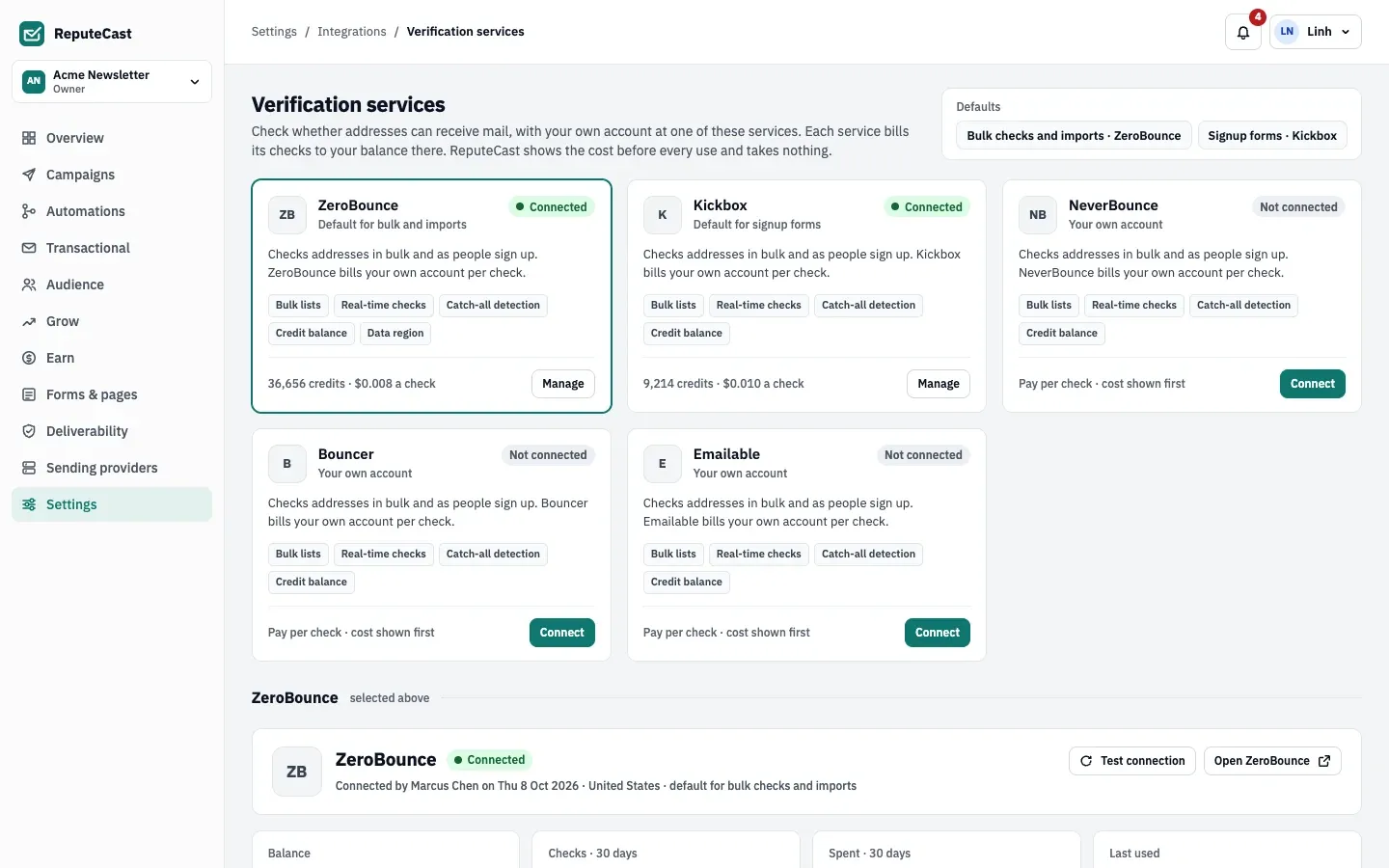
Go to Settings, then Integrations, then Verification services and select Connect on the service’s card.
-
Paste the API key. It is encrypted at rest and never shown again. For ZeroBounce, also pick the data region (United States or European Union).
-
Select Test connection. ReputeCast reads the credit balance and sends no address; nothing is saved until the test passes.
-
Enter Price per check, in dollars (for example
0.008). -
Under Default for, tick Bulk checks and imports, Signup forms, or both. One service can be the default for both; ticking a default moves it from the other service.
Verify a list or tier
Section titled “Verify a list or tier”-
Start from one of these places:
- Audience, then List health: Verify addresses on a tier card, or Verify addresses… in a list’s menu under Health per list.
- Send Readiness: Verify N addresses first when At risk and Sunset recipients not checked in 90 days make up 10% or more of the audience.
- A contact’s profile: Verify now on the Address check row (one credit).
-
In the dialog, pick the Service and keep Skip addresses checked in the last 90 days on to avoid paying twice. Read the cost line (checks × price) and the balance after the job. If the balance is too low, the dialog says so and you add credits at the service first.
-
Select Verify N addresses. The job runs in the background; you can close the tab. Its page shows the progress, the results so far and the time left. The service’s rate limits set the pace.
-
Read the results when the job finishes:
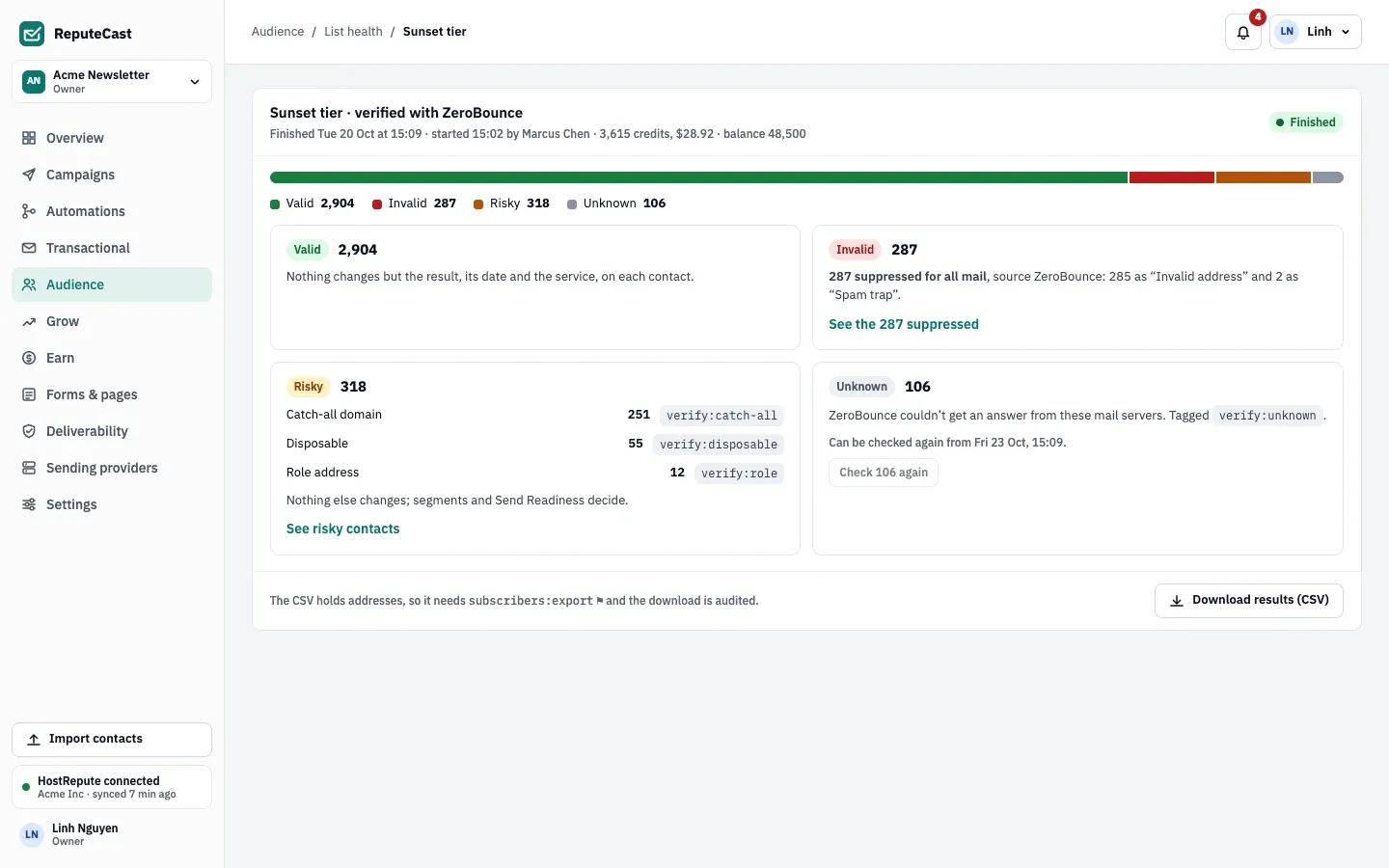
Result What happens to the contact Valid Nothing changes but the result, its date and the service. Older verify:*tags are removed.Invalid Added to the suppression list for all mail, reason “Invalid address” (or “Spam trap”), with the service as the source. Risky Tagged with the reason: verify:catch-all,verify:role,verify:disposable,verify:abuse(ZeroBounce) orverify:low-quality(Kickbox, Bouncer, Emailable). Nothing else changes; segments and Send Readiness decide.Unknown Tagged verify:unknown. It can be checked again 72 hours after the job ends.The service’s own answer is kept beside the result and shown as “Invalid · service: code”, the way bounce codes are.
-
Optional: select Download results (CSV) for
email,result,reason,service_code,checked_at. The download is in the audit log.
Cancel stops a running job and keeps the results so far; addresses not checked yet are never sent. When the service stops answering, the job pauses and retries every 5 minutes for up to an hour (Retry now tries at once), then stops with the results so far. A job stopped because the credits ran out offers Resume once you add credits.
Verify during an import
Section titled “Verify during an import”In the import Preview step, the card Verify the new addresses checks only rows that would become new contacts, with the cost shown. Invalid addresses are skipped; risky and unknown ones are imported and tagged. The check is optional: Import without verifying continues with ReputeCast’s own checks. This check always sends every new address, even ones checked in the last 90 days.
Check addresses on signup forms
Section titled “Check addresses on signup forms”In the form builder, under Spam protection, turn on Check each address with service
as people sign up. It uses the default service for signup forms and needs forms:edit and subscribers:verify.
- Invalid: the form asks the person to fix the address.
- Disposable: rejected only when the form rejects disposable domains and role addresses; otherwise accepted and tagged.
- Risky and unknown: accepted and tagged.
- No answer within 3 seconds: the signup goes through and the address is checked later.
Real-time checks are counted per day and per form on the service’s page, not one by one in the audit log. Turning them on or off is audited.
Defaults and limits
Section titled “Defaults and limits”| Setting | Default | How to change |
|---|---|---|
| Skip addresses checked recently | 90 days (on by default) | Verify dialog › Skip addresses checked in the last 90 days |
| Real-time check on signup forms | Off; when on, waits up to 3 s, then lets the signup through and checks it later | Form builder › Spam protection (needs forms:edit and subscribers:verify) |
| Unknown results can be checked again after | 72 hours | Verify again; untick Skip addresses checked in the last 90 days, or use Verify now on the contact |
| Low credits notification | Under 1,000 credits, or fewer than a stopped job needs | Fixed; sent to members with integrations:manage |
| Job retries while a service is down | Every 5 minutes for 1 hour, then the job stops | Resume on the job |
| Contacts in one selection | Up to 10,000 | Fixed |
When the balance drops under 1,000 credits, or below what a stopped job needs, everyone with integrations:manage
gets a “Verification credits low” notification. The balance is read at each use and every hour.
Check that it worked
Section titled “Check that it worked”- The contact’s Address check row shows the result, the service and the date.
- In Audience, then Contacts, the Address check filter lists contacts by result or Never checked.
- Audience, then Suppression list shows the invalid addresses with the service as the source.
Troubleshooting
Section titled “Troubleshooting”- The Verify buttons are disabled → you don’t have
subscribers:verify. Ask an Owner or Admin. - “Not enough credits” → add credits at the service, then select Read the balance again on the service page.
- “The key was rejected” → select Replace key on the service page, then resume the job.
- Check N again finds nothing to check → Unknown results count as checked. Untick Skip addresses checked in the last 90 days in the dialog.
- Unknown results stay unknown → ReputeCast doesn’t recheck them on its own. Verify them again after 72 hours.