
Import paid members
To migrate paid newsletter subscribers, you upload the subscriber export of your old platform and ReputeCast matches every row with the customers and subscriptions in your own Stripe account. Matched paid members keep billing in Stripe as before: the import only reads from Stripe and never creates, changes or cancels anything there.
Before you begin
Section titled “Before you begin”-
You need the
earn:manageandsubscribers:importpermissions (the Owner and Admin roles have both). Only people can run this import, not API keys. -
Connect Stripe with the account the paid members pay through. A test key is enough to try the import: the members it creates are labelled Test and join no real lists.
-
Create your tiers, so each Stripe price in the export can map to one.
-
Export the subscribers from the old platform. The import dialog’s hint for each one:
Platform Where the export is Substack Settings › Exports › Create new export builds a zip with your posts and subscriber list. Upload the zip as it is. Source: Substack, How do I export my posts? Ghost On the Members page, filter to the paid members, open the … menu and choose export. Source: Ghost, Member management beehiiv Settings › Export Data › Export All Subscribers. beehiiv emails a download link valid for 24 hours. Source: beehiiv, Exporting post content or subscriber data Kit Export your subscribers as a CSV, then keep the paid ones. Source: Kit, How to export subscribers in Kit Sources checked October 2026. Any other CSV works too: it needs an email column, and a Stripe customer ID column makes matching more reliable.
Import the paid members
Section titled “Import the paid members”-
Open Earn, then Paid members, then Import paid members and choose the platform the members come from.
-
Upload: choose the CSV, or the zip the platform exported. ReputeCast finds the email, Stripe customer ID, plan, paid-through date and name columns from their headers and shows an example value for each. Pick the email column by hand if none was found. Nothing changes in contacts or Stripe yet.
-
Match with Stripe: ReputeCast reads every customer and subscription in your Stripe account and matches each row, by Stripe customer ID first, then by email. The rows fall into these groups:
- Active subscription: active, trialing or past due in Stripe. These rows are imported as paid members.
- Subscription ended: imported as free subscribers, and they stay on the tiers’ lists.
- No subscription in Stripe: complimentary on the old platform, gifted, or billed through another Stripe account. Choose Complimentary access until their paid-through date (the default; rows whose date has passed, or that have none, become free subscribers), Import as free subscribers or Skip them.
- Conflicts: one email matches several Stripe customers. For each, choose Use this customer on the customer the member pays with, or Skip this row.
-
Prices and lists: map every Stripe price found to a tier. ReputeCast suggests the tier whose current price has the same amount and billing period; keep an older price as a legacy price of its tier. The import can’t start while a price is unmapped. The members join their tiers’ lists, with the consent evidence “Imported from Substack (paid member)” (or the platform you chose).
-
Choose whether each paid member gets the “Welcome to a paid tier” member email once their row is imported. It is off by default, and then nobody is emailed by the import.
-
Review and import: check the counts and start. The import runs in the background; you can leave the page.
Check that it worked
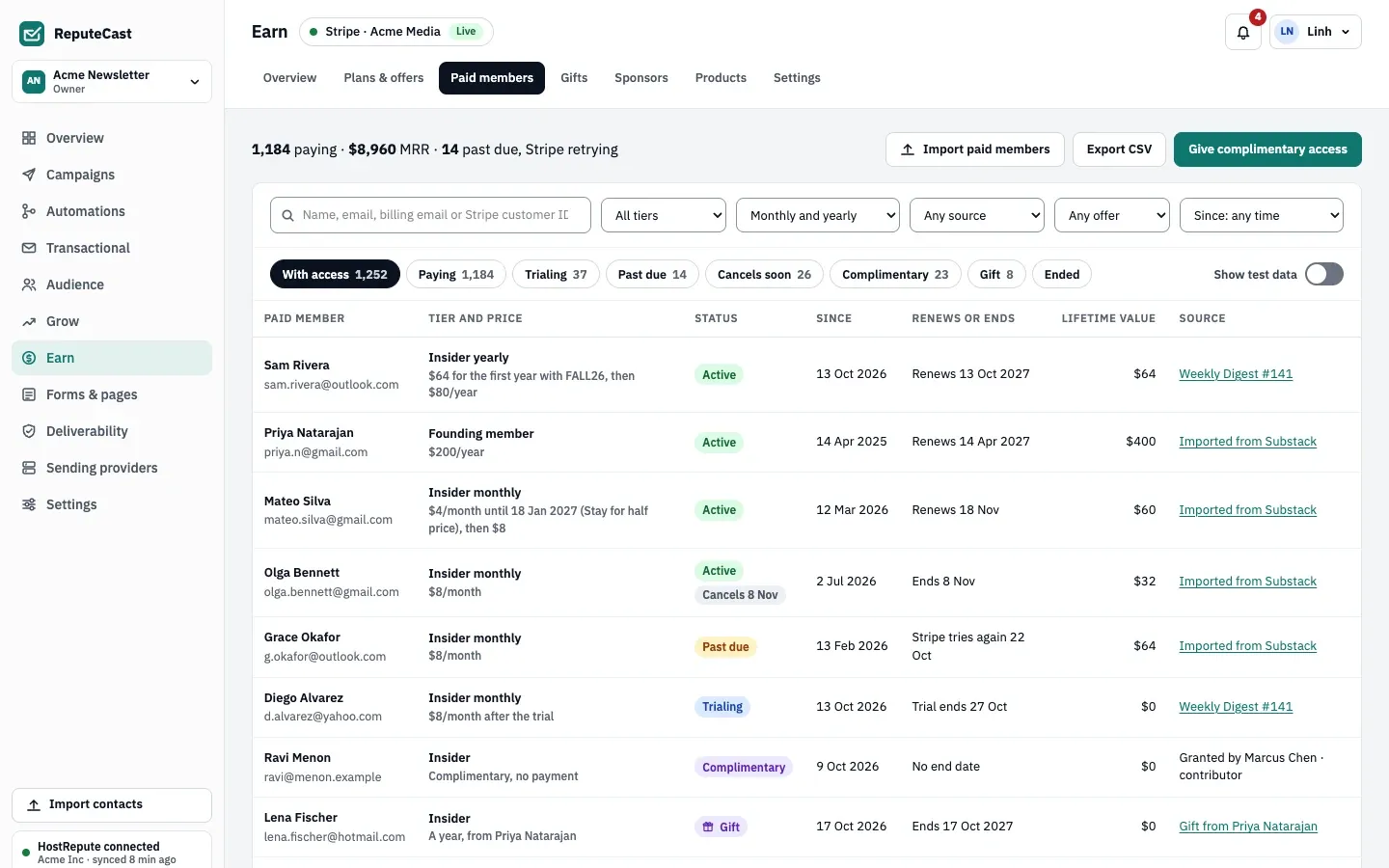
Section titled “Check that it worked”The summary shows how many rows became paid members, free subscribers and complimentary members, how many contacts were merged with existing ones, and how prices were mapped. The import is recorded in the audit log with these counts. On Earn, then Paid members, imported members show the platform as their source.
Before you close the old platform, stop it from charging or emailing these paid members without canceling their subscriptions; ask the platform how. Receipts keep coming from Stripe.
Limits
Section titled “Limits”One export of up to 25 MB and 100,000 rows, in UTF-8, separated by commas or semicolons. Split a larger file and import each part. Every value is on limits and defaults.
Troubleshooting
Section titled “Troubleshooting”- “Stripe isn’t connected.”: connect Stripe first; the import needs the subscriptions to match against.
- “This file couldn’t be read.”: upload the CSV, or the zip, exactly as the platform exported it, saved as UTF-8.
- “No email column found.”: pick the column that holds addresses on the upload step.
- “… isn’t mapped to a tier yet.”: map the price to a tier, or keep it as a legacy price of one.
- “Pick the Stripe customer … pays with, or skip the row.”: settle every conflict before you start.
- Paying members land in “No subscription in Stripe”: their subscription lives in a Stripe account other than the one connected to ReputeCast. ReputeCast can only match subscriptions in the connected account.
- Running the same export twice: a Stripe subscription that ReputeCast already has isn’t created again; the row counts as a paid member and the contact is merged.