
Build segments
A segment picks contacts by what they are and what they did: their lists, tier, mailbox provider, opens, clicks, fields, score and more. Email list segmentation in ReputeCast happens in the condition builder, with a live count as you edit; workspace admins can also write the query in SQL.
Before you begin
Section titled “Before you begin”- Building and saving segments needs
segments:edit(Owner, Admin and Editor). Anyone who can see contacts can see segments and their counts. - SQL segments need
segments:sql(Owner and Admin; sensitive) and a database role your server operator sets up once (see Set up the database role).
Build a segment
Section titled “Build a segment”-
Go to Audience, then Segments and select New segment.
-
Name the segment and choose how it refreshes under Refresh:
- Dynamic · re-evaluated at send time (default): membership is worked out each time a send prepares its audience. The saved count is updated every night.
- Static snapshot: the members are fixed each time you save, and nothing else changes them.
-
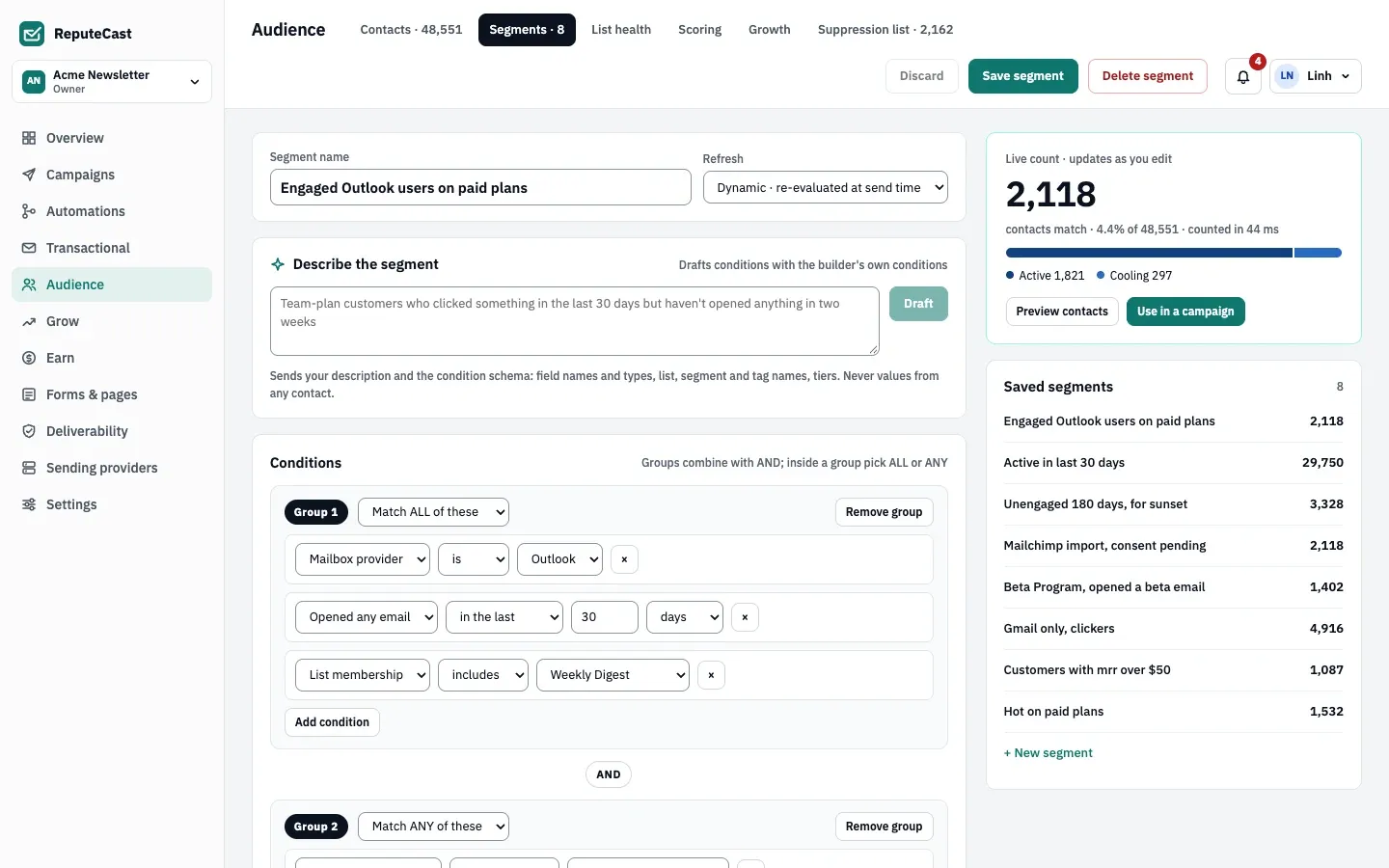
Under Conditions, pick a field, an operator and a value. Inside a group, choose Match ALL of these or Match ANY of these. Select Add condition for another condition in the same group, or Add group for a new group. Groups always combine with AND.
-
Watch the live count on the right. It shows how many contacts match, their share of the workspace and the tier mix of the segment, and updates as you edit.
-
Select Save segment.
Suppressed and role addresses are always left out at send time, whatever the segment says.
Conditions you can use
Section titled “Conditions you can use”| Field | Operators |
|---|---|
| Mailbox provider (Gmail, Outlook, Yahoo, iCloud, Other) | is, is not |
| Email domain, referring domain | is, is not, ends with |
| List membership (subscribed members) | includes, excludes |
| Tier (Active, Cooling, At risk, Sunset) | is, is not |
| Last open | in the last, not in the last, never (days or weeks) |
| Opened any email, clicked any email, joined | in the last, not in the last |
| Opened campaign (recent campaigns) | opened, didn’t open |
| Score (0–100) | is at least, is at most, is between |
| Score band (Cold, Warm, Hot) | is, is not |
| Consent (Double opt-in, Single opt-in, Imported, pending) | is, is not |
| Source, growth source, country, language | is, is not |
| UTM source, UTM medium, UTM campaign | is, is not, contains |
| Tag | has, doesn’t have |
| Custom field, text | equals, not equals, is one of, contains, is empty, is not empty |
| Custom field, number | equals, not equals, greater than, less than, is empty, is not empty |
| Custom field, date | before, after, is empty, is not empty |
| Custom field, yes/no | is true, is false |
Conditions for referrals, phone and SMS, paid subscriptions, purchases, website sign-ins, push, WhatsApp and store customers appear once those features are in use.
Draft conditions from a description
Section titled “Draft conditions from a description”With an AI model connected, the Describe the segment card turns a sentence such as
“Team-plan customers who clicked something in the last 30 days” into builder conditions, marked as added or
removed, with the live count. Only your description and the condition schema are sent: field names and types, and
list, segment and tag names. Values from contacts are never sent. It needs ai:use and never writes SQL.
See the generated query
Section titled “See the generated query”Every builder segment shows the exact query it runs under Generated SQL (read only). Select Copy to reuse it.
Use a segment
Section titled “Use a segment”- Campaign audience: pick it under Segments in the campaign’s audience picker. SMS, push, WhatsApp and digest audiences offer segments too.
- Conditional content: show or hide a block for a segment.
- Audience, then Contacts: Preview contacts opens the contacts filtered by the saved segment.
Use in a campaign opens a new campaign draft; choose the segment in its audience. Automations don’t start from segments; use a list, tag, score or other trigger.
Deleting a segment can’t be undone. If a conditional block uses it, the page warns you, and Send Readiness blocks that campaign until you fix the block.
Write the query yourself
Section titled “Write the query yourself”-
In the builder, select Open in SQL editor. The generated SQL is copied into the editor.
-
Write one
SELECT(orWITH … SELECT) that returns contact ids in a column namedid:Segment SQL SELECT c.idFROM contacts cWHERE c.tier = 'active'AND c.mailbox_provider = 'outlook'AND c.score >= 50 -
Check the live count, then select Save segment.
The query runs read-only, with a 10-second limit, against views of the current workspace only:
| View | Columns |
|---|---|
contacts |
id, email, first_name, last_name, company, country, timezone, language, mailbox_provider, tier, consent, source, status, tags, fields (custom fields, jsonb), role_address, created_at, last_open_at, last_human_open_at, last_click_at, suppressed_at, score, score_band, growth_source, utm_source, utm_medium, utm_campaign, referring_domain, signed_in_at, referrals_counted, referral_milestones, phone, phone_country, sms_lists, last_text_at, last_text_click_at |
list_members |
contact_id, list_id, list, status, subscribed_at, unsubscribed_at |
events |
contact_id, type, human, occurred_at, campaign_id, url, mailbox_provider |
lists |
id, name |
paid_members |
contact_id, status, kind, period, started_at, ended_at, tier_id, tier_rank, access, paid |
paid_tiers |
id, name, rank |
purchases |
contact_id, product_id, product, status, paid, currency, paid_at |
Creating or changing a SQL segment needs segments:sql; an Editor can open one but can’t save it. Back to the
builder drops the SQL text without asking.
Set up the database role
Section titled “Set up the database role”If Open in SQL editor says “SQL segments are turned off on this database”, the
reputecast_segments role is missing. Your server operator creates it and runs the migrations, as described in
PostgreSQL: SQL segments, then restarts ReputeCast so it notices the change.
Defaults and limits
Section titled “Defaults and limits”| Setting | Default | How to change |
|---|---|---|
| Live count timeout | 10 s; the last known count is shown after that | Fixed |
| SQL segment statement timeout | 10 s, in a read-only transaction | Fixed |
| SQL segment length | 20,000 characters, one SELECT or WITH … SELECT | Fixed |
| Builder limits | 20 groups, 50 conditions per group | Fixed |
At send time, builder segments have 30 seconds to resolve and SQL segments keep their 10-second limit; static segments use the members saved with them.
Check that it worked
Section titled “Check that it worked”- The segment appears under Saved segments with its count.
- Preview contacts lists the contacts you expected.
Troubleshooting
Section titled “Troubleshooting”- The live count says “Timed out” → counting took longer than 10 seconds, usually on large workspaces with event conditions. The last known count is shown instead, and builder segments still resolve at send time. Ask your operator to tune PostgreSQL (see PostgreSQL).
- “A segment can have at most 20 groups” or “A group can have at most 50 conditions” → split the segment, or write it in SQL.
- “Your SQL can only read the contacts, list_members, … views” → the query names another table. Use the views above.
- “Only one statement is allowed” → remove the semicolon and anything after it.
- Open in SQL editor is disabled → you don’t have
segments:sql, or SQL segments are turned off on the database.