
Connect Zapier
The ReputeCast app for Zapier is a newsletter integration that starts Zaps from ReputeCast events, or adds contacts, tags them, records events and sends transactional email from your other apps. It’s free and uses only ReputeCast’s public API, with a key that can do only what you allow.
Before you begin
Section titled “Before you begin”- You need
integrations:manage(Owner or Admin). Read Connect other tools for how keys, statuses and the call log work. - Zapier’s servers call your instance, so ReputeCast must be reachable from the internet over HTTPS. An instance on a private network can’t use Zapier; use n8n on the same network instead.
What it can do
Section titled “What it can do”| Trigger | ReputeCast event | Needs |
|---|---|---|
| Contact Subscribed | contact.subscribed |
subscribers:view |
| Contact Unsubscribed | contact.unsubscribed |
subscribers:view |
| Contact Updated | contact.updated |
subscribers:view |
| Form Submitted (optionally one form) | form.submitted |
subscribers:view |
| Campaign Sent | campaign.completed |
campaigns:view |
| Transactional Message Bounced | message.bounced |
transactional:view |
| Action | What it does | Needs |
|---|---|---|
| Create or Update Contact | Matches by email; sets names, custom fields, language and tags; adds to lists with single or double opt-in | subscribers:create, subscribers:edit |
| Add Contact to List | Single or double opt-in | subscribers:edit |
| Add Tag to Contact | One or more tags | subscribers:edit |
| Record Event | An API event with properties; starts the automations that listen for it | subscribers:edit |
| Send Transactional Email | A published template, a recipient, its data and an optional language | transactional:send (sensitive) |
Triggers are instant. Turning a Zap on creates a webhook in ReputeCast, shown read-only as “Managed by Zapier” on Settings, then Webhooks; turning it off removes it. Every delivery is signed, and the app drops a delivery whose signature doesn’t match the Zap’s webhook secret or that is more than 5 minutes old. The event payloads are listed in Webhook events.
Connect Zapier
Section titled “Connect Zapier”-
In ReputeCast, open Settings, then Integrations, find Zapier under Automation platforms and choose Connect.
-
Choose what Zapier may do. Send a transactional email starts off because it needs the sensitive
transactional:send; turn it on only if your Zaps send transactional email. Choose Create key and copy the key (rc_live_…). It’s shown once. -
In Zapier, add a ReputeCast step and create a connection with:
- Instance URL: your ReputeCast address, for example
https://reputecast.acme.io. - Key: the key from step 2.
The connection asks ReputeCast which workspace the key belongs to, so nothing else is needed.
- Instance URL: your ReputeCast address, for example
-
Back in ReputeCast, the connect dialog shows the call arriving (“Zapier called at 14:31 · Test connection · 200”). Choose Done.
Good to know
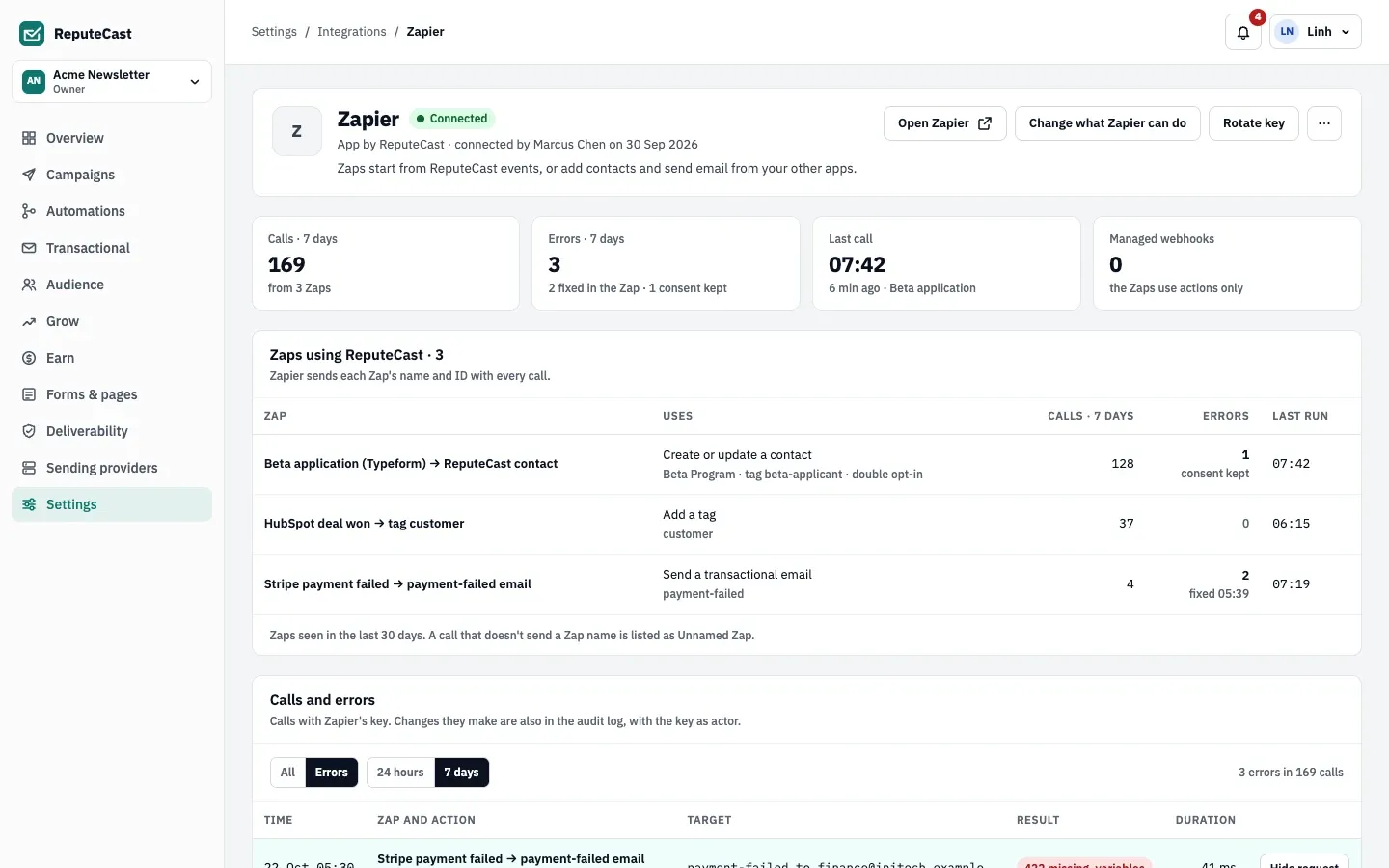
Section titled “Good to know”- Name your Zaps. Zapier gives apps a Zap’s ID but not its name, so every ReputeCast step has an optional Zap
Name field. Type the Zap’s name there to tell your Zaps apart on ReputeCast’s Zapier page; without it, the Zap is
listed as “Unnamed Zap”. The app sends both in the
X-ReputeCast-Workflowheader. - Consent is kept. ReputeCast never adds someone back to a list they left, never adds a suppressed address and never sends transactional email to one. Those runs end as Halted with ReputeCast’s reason (“[email protected] left Beta Program on 2 Oct…”). They don’t count as errors, so the Zap keeps running for everyone else.
- Errors in ReputeCast’s words. Other refusals show ReputeCast’s sentence, for example a missing template variable (“payment-failed v1 needs amount_due.”) or an action that’s off (“Change what Zapier can do in Settings › Integrations”).
- Idempotency. Send Transactional Email takes an optional Idempotency Key, such as the triggering event’s ID. When the same Zap runs again with the same value within 24 hours, ReputeCast sends nothing new. Read Send transactional email with the API.
- Language. Send Transactional Email’s Language picks a language version of the template (
es,de…). Without it, the contact’s language is used, then the workspace’s fallback language. - Rotating the key in ReputeCast keeps the old one working for 24 hours, so you can paste the new key without failed runs.
Troubleshooting
Section titled “Troubleshooting”- Zapier asks you to reconnect: the key was revoked or expired. In ReputeCast choose Reconnect on the Zapier page and paste the new key into the Zapier connection.
- “…take it over in Settings › Integrations › Zapier”: the person who connected Zapier left the workspace. Choose Take over; the key stays the same.
- The connect dialog says your instance isn’t reachable: Zapier can’t reach ReputeCast’s public URL. Read Reverse proxy and TLS.
- A trigger never fires: check that the Zap is on and that the webhook is listed on Settings, then Webhooks. Failed deliveries are retried and then kept to replay; read Receive webhooks.