
Send transactional email with the API
The transactional email API sends password resets, receipts and other one-to-one messages from a published transactional template: one message per call, or a batch of up to 100. Each call answers at once with a message ID, and the message goes out on the Transactional stream through its own route and failover.
Before you begin
Section titled “Before you begin”- A published transactional template. Its template ID (for example
password-reset) is what the API takes. See Create and publish transactional templates. - A verified sender on a domain used for Transactional mail. See Add sending domains and senders.
- A route for the Transactional stream to a connected sending provider. See Route mail across providers.
- A key that holds
transactional:send. The best fit is a send-only key, created in Transactional, then Setup with Create send-only key. It holdstransactional:sendand nothing else, can be limited to some templates or categories, and has its own send rate. Any other API key withtransactional:sendworks too (Authentication and API keys).
If you have none of this yet, the first-send guide walks you through all four in the app.
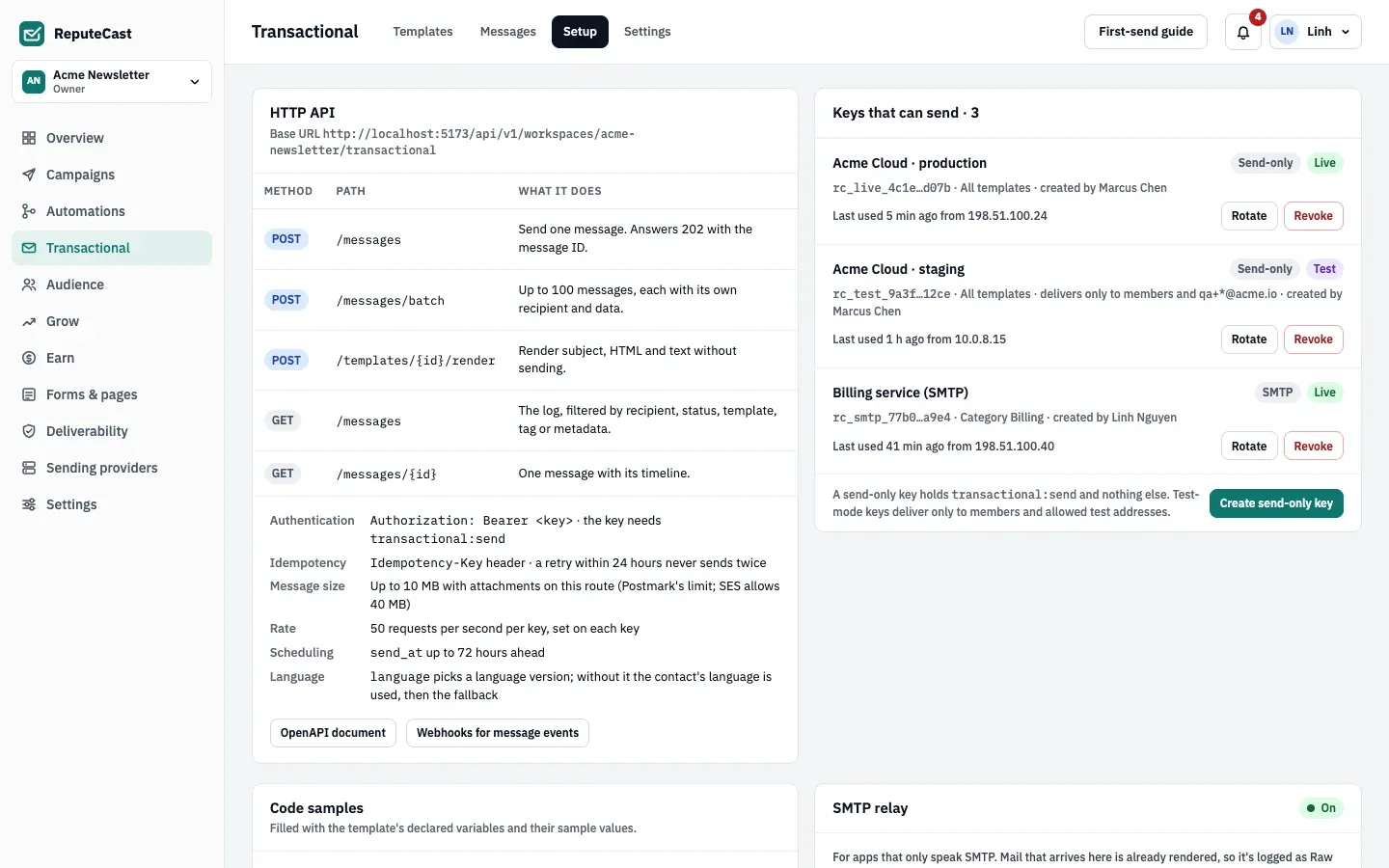
Send one message
Section titled “Send one message”-
Copy your public URL, your workspace slug and the key. The examples read the key from the
REPUTECAST_API_KEYenvironment variable; replacereputecast.example.comandyour-workspacewith your own values. -
Send
POST /api/v1/workspaces/<workspace>/transactional/messageswith the template ID, the recipient and the template’s variables indata. Send anIdempotency-Keyheader so a retry never sends twice.send.sh # REPUTECAST_API_KEY: an API key (rc_live_…) with transactional:send.# Replace reputecast.example.com with your public URL and your-workspace with your workspace slug.curl --request POST \--url https://reputecast.example.com/api/v1/workspaces/your-workspace/transactional/messages \--header "Authorization: Bearer $REPUTECAST_API_KEY" \--header 'Content-Type: application/json' \--header 'Idempotency-Key: password-reset-8f14e45f' \--data '{"template": "password-reset","to": { "email": "[email protected]", "name": "Sam Rivera" },"data": {"first_name": "Sam","reset_url": "https://app.example.com/reset/8f14e45f","expires_in": "30 minutes"},"tags": ["password-reset"]}'send.mjs // REPUTECAST_API_KEY: an API key (rc_live_…) with transactional:send.// Replace reputecast.example.com with your public URL and your-workspace with your workspace slug.const response = await fetch('https://reputecast.example.com/api/v1/workspaces/your-workspace/transactional/messages',{method: 'POST',headers: {Authorization: `Bearer ${process.env.REPUTECAST_API_KEY}`,'Content-Type': 'application/json',// A retry with the same key within 24 hours never sends twice.'Idempotency-Key': 'password-reset-8f14e45f',},body: JSON.stringify({template: 'password-reset',data: {first_name: 'Sam',reset_url: 'https://app.example.com/reset/8f14e45f',expires_in: '30 minutes',},tags: ['password-reset'],}),},)const result = await response.json()if (!response.ok) throw new Error(`${response.status} ${result.code}: ${result.detail}`)console.log(result.id, result.status) // status: queuedsend.py # REPUTECAST_API_KEY: an API key (rc_live_…) with transactional:send.# Replace reputecast.example.com with your public URL and your-workspace with your workspace slug.import osimport requestsresponse = requests.post("https://reputecast.example.com/api/v1/workspaces/your-workspace/transactional/messages",headers={"Authorization": f"Bearer {os.environ['REPUTECAST_API_KEY']}",# A retry with the same key within 24 hours never sends twice."Idempotency-Key": "password-reset-8f14e45f",},json={"template": "password-reset","data": {"first_name": "Sam","reset_url": "https://app.example.com/reset/8f14e45f","expires_in": "30 minutes",},"tags": ["password-reset"],},timeout=10,)result = response.json()if not response.ok:raise RuntimeError(f"{response.status_code} {result.get('code')}: {result.get('detail')}")print(result["id"], result["status"]) # status: queuedmain.go // REPUTECAST_API_KEY: an API key (rc_live_…) with transactional:send.// Replace reputecast.example.com with your public URL and your-workspace with your workspace slug.package mainimport ("bytes""encoding/json""fmt""log""net/http""os")func main() {body, err := json.Marshal(map[string]any{"template": "password-reset","data": map[string]string{"first_name": "Sam","reset_url": "https://app.example.com/reset/8f14e45f","expires_in": "30 minutes",},"tags": []string{"password-reset"},})if err != nil {log.Fatal(err)}req, err := http.NewRequest(http.MethodPost,"https://reputecast.example.com/api/v1/workspaces/your-workspace/transactional/messages", bytes.NewReader(body))if err != nil {log.Fatal(err)}req.Header.Set("Authorization", "Bearer "+os.Getenv("REPUTECAST_API_KEY"))req.Header.Set("Content-Type", "application/json")// A retry with the same key within 24 hours never sends twice.req.Header.Set("Idempotency-Key", "password-reset-8f14e45f")resp, err := http.DefaultClient.Do(req)if err != nil {log.Fatal(err)}defer resp.Body.Close()var result struct {ID string `json:"id"`Status string `json:"status"`Code string `json:"code"`Detail string `json:"detail"`}if err := json.NewDecoder(resp.Body).Decode(&result); err != nil {log.Fatal(err)}if resp.StatusCode >= 300 {log.Fatalf("%d %s: %s", resp.StatusCode, result.Code, result.Detail)}fmt.Println(result.ID, result.Status) // status: queued}send.php <?php// REPUTECAST_API_KEY: an API key (rc_live_…) with transactional:send.// Replace reputecast.example.com with your public URL and your-workspace with your workspace slug.$payload = ['template' => 'password-reset','data' => ['first_name' => 'Sam','reset_url' => 'https://app.example.com/reset/8f14e45f','expires_in' => '30 minutes',],'tags' => ['password-reset'],];$ch = curl_init('https://reputecast.example.com/api/v1/workspaces/your-workspace/transactional/messages');curl_setopt_array($ch, [CURLOPT_POST => true,CURLOPT_RETURNTRANSFER => true,CURLOPT_HTTPHEADER => ['Authorization: Bearer ' . getenv('REPUTECAST_API_KEY'),'Content-Type: application/json',// A retry with the same key within 24 hours never sends twice.'Idempotency-Key: password-reset-8f14e45f',],CURLOPT_POSTFIELDS => json_encode($payload, JSON_THROW_ON_ERROR),]);$body = curl_exec($ch);if ($body === false) {throw new RuntimeException(curl_error($ch));}$status = curl_getinfo($ch, CURLINFO_RESPONSE_CODE);$result = json_decode($body, true, flags: JSON_THROW_ON_ERROR);if ($status >= 300) {throw new RuntimeException("{$status} {$result['code']}: {$result['detail']}");}echo $result['id'], ' ', $result['status'], PHP_EOL; // status: queued -
Read the answer. ReputeCast answers
202 Acceptedonce the message is checked, rendered and queued:202 Accepted { "id": "0192f1c4-7b2e-7c51-9d0a-3f5e8b1a2c44", "status": "queued" }statusisqueued,scheduled(withsend_at) ornot_delivered(a test-mode key’s message to an address it may not deliver to). Keep theid: the message log, the API and everymessage.*webhook event use it.
The Node.js example needs Node.js 18 or later (built-in fetch), and the Python example needs the requests
package. The operation reference lists every field and answer.
Request body
Section titled “Request body”| Field | Required | What it does |
|---|---|---|
template |
Yes | The template ID, up to 64 characters. ReputeCast sends the template’s live (published) version. |
to |
Yes | { "email": "…", "name": "…" }. name is optional. |
data |
No | The template’s variables. A call without a variable the template marks required gets 422 missing_variables. |
from |
No | A verified Transactional sender, as address or Name <address>. Without it: the template’s sender, then the workspace default, then the first verified Transactional sender. |
reply_to |
No | An address. Without it, the template’s or the sender’s reply-to applies. |
subject, preheader |
No | Replace the template’s subject or preheader for this message. Both accept Liquid. |
language |
No | The language version to send, such as es or pt-BR. Without it, the linked contact’s language, then the workspace’s fallback. |
cc, bcc |
No | Up to 20 addresses each, in the same shape as to. |
attachments |
No | Up to 20 files: filename, content (standard base64), optional content_type (guessed from the file name) and content_id for inline images (cid:). |
tags |
No | Up to 10 strings. They come back with every webhook event of the message. |
metadata |
No | Up to 20 string pairs (keys up to 100 characters, values up to 500). They come back with every webhook event. |
send_at |
No | An RFC 3339 time up to 72 hours ahead. See Schedule a message. |
Unknown fields are refused with 422 validation_failed. A recipient who matches a contact shows the message in that
contact’s activity; the API never creates contacts.
Send a batch
Section titled “Send a batch”POST …/transactional/messages/batch takes { "messages": [ … ] } with 1 to 100 messages, each in the same shape
as a single send. More than 100 is refused; split larger sends into several calls.
# REPUTECAST_API_KEY: an API key (rc_live_…) with transactional:send. Up to 100 messages per call.# Replace reputecast.example.com with your public URL and your-workspace with your workspace slug.curl --request POST \ --url https://reputecast.example.com/api/v1/workspaces/your-workspace/transactional/messages/batch \ --header "Authorization: Bearer $REPUTECAST_API_KEY" \ --header 'Content-Type: application/json' \ --header 'Idempotency-Key: welcome-2026-10-22-0900' \ --data '{ "messages": [ { "template": "welcome", "to": { "email": "[email protected]", "name": "Priya Shah" }, "data": { "first_name": "Priya", "dashboard_url": "https://app.example.com/" } }, { "template": "welcome", "to": { "email": "[email protected]" }, "data": { "dashboard_url": "https://app.example.com/" } } ] }'The batch answers 200 OK with one result per message, in the order sent, and the totals:
{ "accepted": 1, "failed": 1, "results": [ { "index": 0, "id": "0192f1c4-8a10-7d3e-b4f2-6c1d9e0a7b55", "status": "queued" }, { "index": 1, "status": "error", "error": { "status": 422, "title": "Missing variables", "code": "missing_variables", "detail": "welcome v3 needs first_name. Add it to data and call again.", "missing": ["first_name"] } } ]}One message’s problem never stops the others. The batch operation reference has the same example in Node.js, Python, Go and PHP.
Retry safely with Idempotency-Key
Section titled “Retry safely with Idempotency-Key”Send an Idempotency-Key header (up to 255 characters) with every send, for example your own event or order ID.
- A retry with the same key and the same body within 24 hours gets the first answer again and sends nothing.
- The same key with a different body within 24 hours gets
409 idempotency_key_reused. Use a new key for a new message. - After 24 hours the key is forgotten and can be used again.
- A batch’s key covers the whole batch; each message in it is recorded under
<key>#<index>.
Retry on network errors, 429 and 503 with the same key. Don’t retry 422 answers without changing the request.
Schedule a message
Section titled “Schedule a message”Set send_at to send later, up to 72 hours ahead. A later time gets 422 validation_failed (“send_at can be at most
72 hours ahead”); schedule later sends in your own app. A time in the past, or less than a second ahead, sends now.
The answer has "status": "scheduled" and the send_at it will use.
Test without emailing customers
Section titled “Test without emailing customers”A send-only key in test mode starts with rc_test_. It renders and logs every message, but delivers only to the
workspace’s members and the key’s allowed test addresses (patterns such as qa+*@example.com). Any other recipient
gets "status": "not_delivered" and "test": true, and nothing is sent. Use it in staging and CI.
To check the subject, HTML and text without sending or logging anything, call
POST …/transactional/templates/<template>/render with the same to, data and language
(render operation).
Errors
Section titled “Errors”Errors are RFC 9457 problem documents whose detail says what to fix. The codes a send
can get:
422 template_not_found,422 template_not_published: check the template ID, or publish the template.422 missing_variables: add the variables listed inmissingtodata.422 invalid_recipient: validate addresses in your app before calling.422 recipient_suppressed: the address bounced, complained or is a spam trap, or the recipient turned off this message’s Optional category. The message is still in the log, with amessage.rejectedevent. Unsubscribes from newsletters don’t stop transactional mail.422 sender_not_verified:fromisn’t a verified Transactional sender, or none exists yet.422 attachments_too_large: the message is larger than the route’s sending provider accepts; the detail names the limit.422 template_does_not_render: the live version fails with this data; the detail says why.403 template_not_allowed: the key is limited to other templates or categories.409 idempotency_key_reused: see Retry safely with Idempotency-Key.429 rate_limited: the key’s send rate is used up. Wait forRetry-Afterseconds and send again with the same idempotency key.503 no_healthy_route: every sending provider in the route is down. Retry with the same idempotency key.
Rate limits
Section titled “Rate limits”Each key has its own send rate: 50 messages per second unless the key sets another rate (1–10,000). A batch counts as its number of messages. People who send from the app share 50 per second each. These endpoints don’t count toward the general API limit of 600 requests per minute (Rate limits).
Each server process keeps its own counters, so several web nodes behind a load balancer together allow up to their number times the rate.
Check that it worked
Section titled “Check that it worked”- Open Transactional, then Messages and find the message by recipient, or
call
GET …/transactional/messages/<id>for its timeline. See Message log and alerts. - Subscribe an endpoint to
message.delivered,message.bouncedandmessage.failedto hear about each message as it happens (Receive webhooks). Theirdatacarriesmessage_id,template,to,status,provider, yourtagsandmetadata.
Troubleshooting
Section titled “Troubleshooting”401 unauthenticated: send the key asAuthorization: Bearer <key>; check that it isn’t revoked or expired.403 permission_denied: the key lackstransactional:send, or its creator no longer holds it.422 sender_not_verifiedon every call: add a sender on a Transactional domain in Settings, then Senders and verify its DNS records.status: not_delivered: you are using a test-mode (rc_test_) key; send with a live key, or add the address to the key’s test addresses.- Duplicate messages after timeouts: send an
Idempotency-Key, and reuse the same one on every retry.
Limits
Section titled “Limits”| Setting | Default | How to change |
|---|---|---|
| Messages per batch call | 1–100 | Fixed |
Scheduling ahead with send_at | Up to 72 hours | Fixed |
Idempotency-Key window | 24 hours; keys up to 255 characters | Fixed |
| cc, bcc and attachments per message | Up to 20 each | Fixed |
| Message size with attachments | The smallest limit among the route's providers: Postmark, Brevo and Azure Communication Services 10 MB, Postal 14, Mailjet 15, SparkPost 20, SMTP and Mailgun 25, SendGrid 30, Amazon SES and Resend 40 | Sending providers › Routing |
| Tags and metadata per message | Up to 10 tags (100 characters each); up to 20 metadata pairs | Fixed |
| Template ID | Lowercase letters, digits and single hyphens, up to 64 characters; fixed after the first publish | Template settings |
| Rendered content kept | 30 days | Transactional › Settings; don't keep, 7, 30, 60 or 90 days |
| Message metadata and events kept | 90 days | Fixed |
| Bounce rate alert (per template, last hour, at least 20 sent) | Above 2% | Transactional › Settings › Delivery alerts, 0.1–100% |
| Failed messages alert (last hour) | 10 or more | Transactional › Settings › Delivery alerts, 1–100,000 |
| Median delivery time alert (last hour, at least 20 delivered) | Above 30 s | Transactional › Settings › Delivery alerts, 1–3,600 s |
| Retries on the primary provider before the fallback takes over | 10 minutes (at once if the provider is down) | Fixed |
| Soft bounces before an address is suppressed | 3 within 7 days | Fixed |
| Breaking-change check at publish looks at | The last 7 days of calls | Fixed |
| Template import from files | Up to 50 files, 2 MB each | Fixed |