
Connect AI agents with MCP
ReputeCast includes a Model Context Protocol (MCP) server, so an AI assistant can read reports, check Send Readiness, draft campaigns or pause a send in your workspace: an MCP server email marketing teams can control. Each MCP agent gets its own token and permissions, never more than the person who created it, and anything that would send mail goes to a person as a proposal instead of running.
Before you begin
Section titled “Before you begin”- You need
mcp:managein the workspace (a sensitive permission). You can only give an agent permissions you hold yourself. - Your instance needs a public URL your MCP client can reach over HTTPS. The endpoint is
<public URL>/mcp, served by the web role. - If ReputeCast runs behind a reverse proxy,
/mcpmust stream responses without buffering. See Reverse proxy and TLS.
Create an agent
Section titled “Create an agent”-
Open Settings, then Keys & MCP. The MCP card at the top shows the endpoint, for example
https://reputecast.example.com/mcp. -
Select Add agent. Give the agent a name that says who uses it, such as “Claude: analytics”.
-
Pick its permissions. Start with read access, such as
reports:viewanddeliverability:view, and add more later. A permission you don’t hold is locked. Agents can never holdsubscribers:verify,placement:run,placement:manage,integrations:manage,ai:useor the agency permissions. -
Optionally limit the agent to some lists and set an expiry, then create it.
-
Copy the token,
rc_agent_…. It is shown once; ReputeCast keeps only its SHA-256 hash.
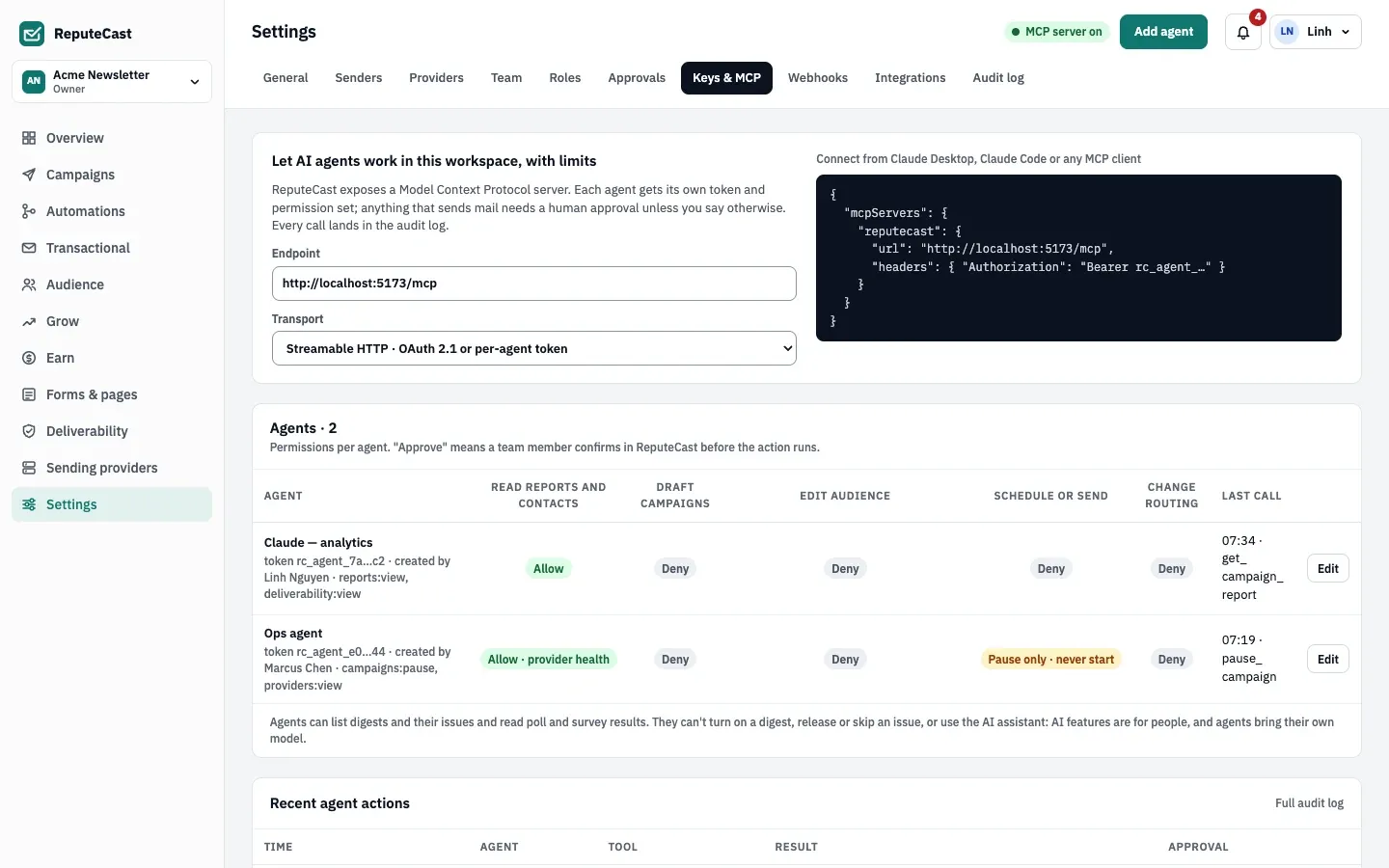
The agents matrix shows what each agent can do, derived from its permissions:
| Column | Allow when the agent holds | Notes |
|---|---|---|
| Read reports and contacts | reports:view or subscribers:view |
Shows “Allow · provider health” or “Allow · deliverability” for narrower read access. |
| Draft campaigns | campaigns:edit |
Drafts only; nothing is sent. |
| Edit audience | subscribers:edit, segments:edit or lists:manage |
|
| Schedule or send | campaigns:send shows “Approve”; campaigns:pause alone shows “Pause only · never start” |
Scheduling always needs a person. See Proposals. |
| Change routing | providers:manage |
Connect your MCP client
Section titled “Connect your MCP client”The server speaks MCP’s Streamable HTTP transport. Every request carries the agent token as a bearer token:
Authorization: Bearer rc_agent_…ReputeCast accepts only agent tokens here: an API key (rc_live_…) or a session cookie is refused. Pick your client
below. The examples read the token from the REPUTECAST_AGENT_TOKEN environment variable; replace
reputecast.example.com with your public URL.
claude mcp add --transport http reputecast https://reputecast.example.com/mcp \ --header "Authorization: Bearer $REPUTECAST_AGENT_TOKEN"To share the server with a project, add it to .mcp.json at the project root instead. Claude Code needs
"type": "http" on a server with a url; an entry without type is read as a local command and skipped:
{ "mcpServers": { "reputecast": { "type": "http", "url": "https://reputecast.example.com/mcp", "headers": { "Authorization": "Bearer ${REPUTECAST_AGENT_TOKEN}" } } }}Run claude mcp get reputecast to check the connection. Source:
Claude Code MCP documentation, checked October 2026.
Add the server to ~/.cursor/mcp.json (every project) or .cursor/mcp.json (one project):
{ "mcpServers": { "reputecast": { "url": "https://reputecast.example.com/mcp", "headers": { "Authorization": "Bearer ${env:REPUTECAST_AGENT_TOKEN}" } } }}Cursor fills ${env:NAME} from your environment. Source:
Cursor MCP documentation, checked October 2026.
Add the server to .vscode/mcp.json in your workspace. VS Code asks for the token once and stores it securely:
{ "inputs": [ { "type": "promptString", "id": "reputecast-agent-token", "description": "ReputeCast agent token (rc_agent_…)", "password": true } ], "servers": { "reputecast": { "type": "http", "url": "https://reputecast.example.com/mcp", "headers": { "Authorization": "Bearer ${input:reputecast-agent-token}" } } }}Source: VS Code MCP configuration reference, checked October 2026.
Any client that connects to a remote MCP server by URL and lets you set a request header works. Most use this shape;
check your client’s documentation for the file name and whether it also needs "type": "http":
{ "mcpServers": { "reputecast": { "url": "https://reputecast.example.com/mcp", "headers": { "Authorization": "Bearer rc_agent_…" } } }}A client that only starts local (stdio) servers needs a local bridge to a remote HTTP server; ReputeCast doesn’t ship one.
What an agent can do
Section titled “What an agent can do”The server offers 53 tools, 3 resources and 2 prompts. Each tool checks one permission, exactly like an API key, and campaigns can be named by their name or ID. The full list, with each tool’s permission and effect, is in MCP tools, resources and prompts.
- Read: campaign lists and reports, Send Readiness, live send statistics, provider health, routing, deliverability, placement tests, automations, digests, polls, growth, revenue and website content.
- Change: create campaign, SMS, push, WhatsApp and website post drafts; update a campaign’s content; create segments; add addresses to the suppression list; change routing weights; pause and resume sends.
- Send a test:
send_test_emailsends a campaign test only to members of the workspace, through the System stream. - Transactional email: read-only. Agents list and render templates and search the message log, but never send transactional messages.
- Resources: a campaign’s MJML, a report as CSV, and the latest 100 audit log entries.
An agent’s permissions are checked again on every call against its creator’s current role. When the creator loses a permission, the agent loses it too; when the creator leaves the workspace or is deactivated, the agent can do nothing.
Proposals for anything that sends
Section titled “Proposals for anything that sends”Agents don’t start sends.
schedule_campaignnever schedules. It records a proposal for the first member who holdscampaigns:send, who gets a notification (“Claude: analytics asked to schedule Weekly Digest #142”) with a link to the campaign. That person schedules it in ReputeCast, where Send Readiness and approvals apply as usual.- A call the agent lacks the permission for is denied. The agent gets an error that names the missing permission, the denial is recorded in the audit log, and a proposal goes to the first member who holds it.
- The notification states when the proposal expires: 2 hours by default, 1–168 hours under Change limits. ReputeCast never carries out a proposal itself, so the expiry tells the person how long the request is current; nothing happens when it passes.
pause_campaignneedscampaigns:pauseand pauses at once.resume_campaignneedscampaigns:sendand resumes at once: givecampaigns:sendto an agent only if it may restart a paused send.
Audit and limits
Section titled “Audit and limits”Every tool call lands in the audit log with the agent as actor, the tool name and the result, including denied calls. Recent agent actions on the same page shows the latest calls; open the audit log for the rest.
Change limits sets the calls per minute per agent and the proposal expiry for the workspace, and
turns the MCP server off. While it is off, every agent token is refused. An agent over its limit gets 429 with
Retry-After: 60.
| Setting | Default | How to change |
|---|---|---|
| Calls per minute per agent | 120 | Settings › Keys & MCP › Change limits, 1–6,000 |
| Proposal expiry stated to the agent and the approver | 2 hours | Settings › Keys & MCP › Change limits, 1–168 hours |
| Idle MCP session ends after | 30 minutes | Fixed |
Check that it worked
Section titled “Check that it worked”- Ask your assistant to list the tools of the
reputecastserver, or to calllist_campaigns. It should list your campaigns. - In Settings, then Keys & MCP, the agent’s last call appears in the agents matrix and under Recent agent actions.
Troubleshooting
Section titled “Troubleshooting”- 401 “use an MCP agent token (rc_agent_…)”: the client sends an API key or no header. Create an agent and use its token.
- 401 “this agent was revoked” or “… expired”: create a new agent or rotate its token in Settings, then Keys & MCP.
- 401 “the MCP server is off”: turn it on under Change limits.
- The client connects but every tool is denied: the agent lacks the permission, or its creator no longer holds it. The error names the permission.
- Claude Code skips the server: the
.mcp.jsonentry has aurlbut no"type": "http". - Calls hang or time out behind a proxy: the proxy buffers
/mcpresponses. Turn off buffering for that path. - 429 errors: the agent made more calls than the workspace allows per minute. Raise the limit or slow the agent.