
Delivery events and suppression sync
Every sending provider reports what happened to your mail in its own format: Amazon SES through SNS notifications, Postmark and Mailgun through webhooks, an SMTP server through bounce messages in a mailbox. ReputeCast turns these email bounce webhook events, deliveries and complaints into one normalized event model, keeps the provider’s original code next to it, and shares every bounce and complaint through one suppression list.
How events arrive
Section titled “How events arrive”- The provider calls ReputeCast. Each connected provider has its own webhook address,
https://<public URL>/hooks/<adapter>/<token>. The connect wizard registers it at the provider for you, or shows it to paste in. Read Connect a sending provider. - ReputeCast checks the signature. Each adapter verifies the request the way its provider signs it (an SNS
signature for Amazon SES, an HMAC for Mailgun, an ECDSA signature for SendGrid, a shared secret for providers that
don’t sign). A request that fails is answered
401and never processed; the first 2 KB of it are kept for diagnosis. - It stores the raw payload and answers at once. A verified payload is saved as it arrived and the provider gets
200straight away, so slow processing never makes a provider retry or give up. If ReputeCast can’t store it, it answers429withRetry-After: 30rather than a5xx, because some providers drop events after a server error. - A background job normalizes it. The payload becomes one or more normalized events, matched to the message ReputeCast sent. Redelivered events are recognized and counted once.
- The event takes effect. It updates the message’s status, the campaign’s counters per mailbox provider and sending provider, and the provider’s daily statistics. Hard bounces, complaints and unsubscribes reported by the provider add the address to the shared suppression list, and the contact is marked bounced or complained.
Providers without webhooks take the same path from step 4: ReputeCast reads bounces from an SMTP server’s bounce mailbox every minute, and polls the events API of Mailgun or SparkPost every minute when you chose polling in the connect wizard.
Normalized events
Section titled “Normalized events”| Event | Meaning | Suppresses the address |
|---|---|---|
delivered |
The receiving mail server accepted the message. | No |
deferred |
Delivery was delayed with a temporary error; the provider retries. | No |
hard_bounce |
Delivery failed permanently, for example because the mailbox doesn’t exist. | Yes |
soft_bounce |
Delivery failed for a reason that may be temporary, such as a full mailbox. | No |
complaint |
The recipient marked the message as spam (a feedback-loop report). | Yes |
rejected |
The provider refused to send the message at all. | No |
open |
An open the provider tracked. | No |
click |
A click the provider tracked. | No |
unsubscribe |
An unsubscribe the provider received. | Yes |
Every event keeps the provider’s original event type (such as Bounce · Permanent · General or HardFail), its
original code (such as 550 5.1.1) and the diagnostic text. Bounces also get a
bounce class: mailbox_unknown, mailbox_full, domain_invalid, policy_block,
spam_block, reputation, temporary or other. The class tells you why mail failed regardless of how each provider
words it; read Bounces, complaints and provider limits and the
SMTP error codes.
ReputeCast tracks opens and clicks itself. A provider’s own open and click events only count when you chose to keep
that provider’s tracking (see Provider-side tracking check).
The event log
Section titled “The event log”Sending providers, then Events & sync starts with the Event log: every raw provider event beside its normalized form, its original code and diagnostic, the masked recipient and the campaign, automation or system mail it belongs to. Filter by sending provider or event type, or search for a recipient or a message ID.
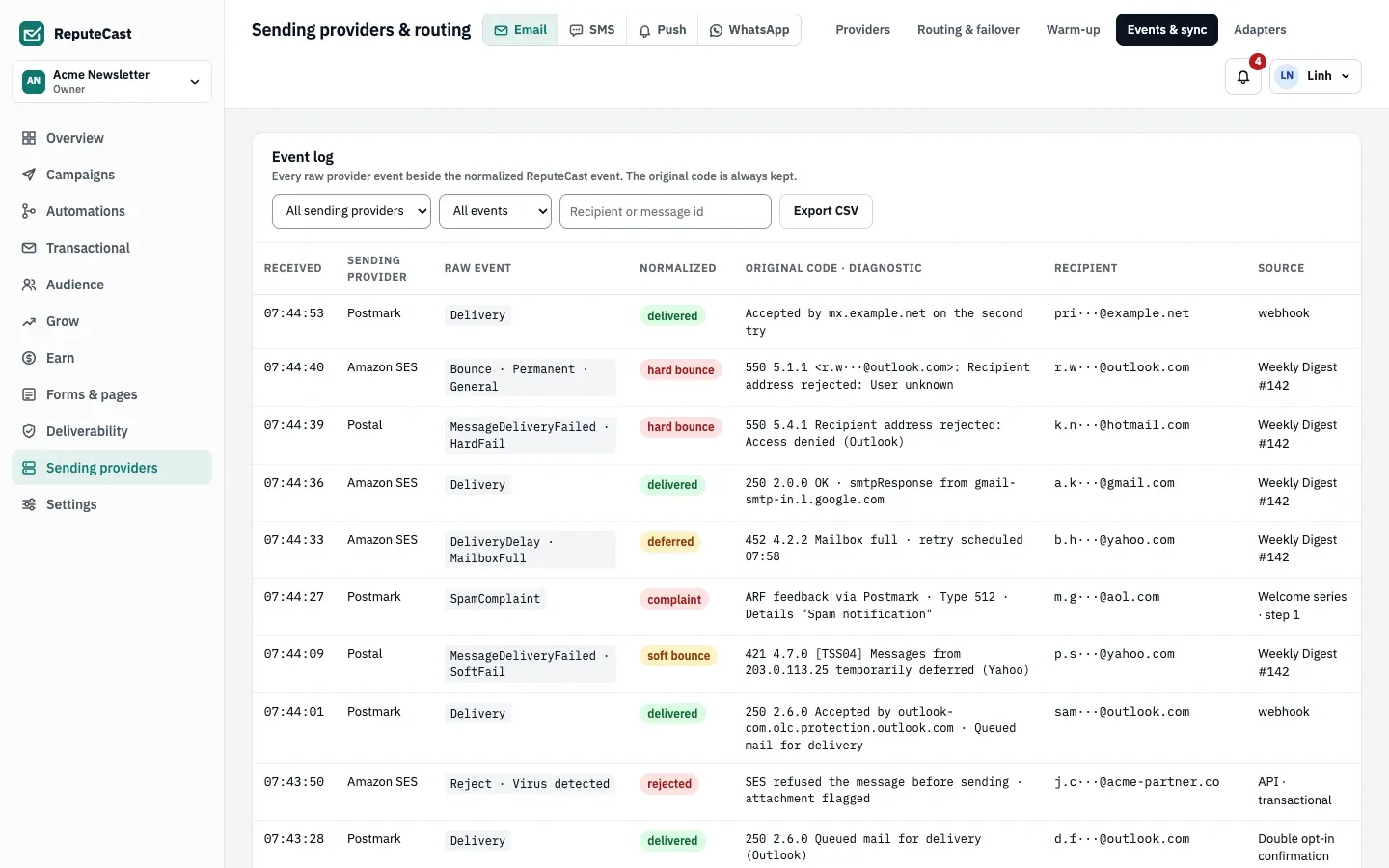
Export CSV downloads the filtered events. Recipients stay masked unless you have the
subscribers:export permission, and every export is recorded in the audit log.
Suppression sync
Section titled “Suppression sync”A bounce or complaint at one provider stops mail to that address on every provider. The Shared suppression list sync card shows how each provider takes part:
- Two-way: ReputeCast pulls the provider’s own suppressions into the shared list and pushes new shared suppressions to the provider’s suppression list.
- Pull only: the provider lists its suppressions but its API can’t take new ones (Brevo). ReputeCast pulls them.
- Local only (shown as Enforced locally): the provider has no suppression API (Postal, SMTP, Azure Communication Services, the generic HTTP adapter). ReputeCast checks the shared list before every send.
Sync runs every 15 minutes for every provider, and soon after an event adds new suppressions. To run it now, choose
Sync all now (needs providers:manage). The card shows what each provider pulled in and
pushed out, the last sync and any error. Read The suppression list to add, upload or remove
addresses by hand.
Provider-side tracking check
Section titled “Provider-side tracking check”Some providers add their own open pixel or rewrite links for click tracking. With ReputeCast’s tracking on top, opens are counted twice and links are rewritten twice. Once a day, ReputeCast reads each provider’s tracking settings, and the Provider-side tracking check card lists what it found. For a provider that tracks, you can:
- turn its tracking off through the provider’s API (where the API allows it),
- keep the provider’s tracking and ignore ReputeCast’s, or
- go back to ReputeCast’s tracking.
Brevo adds its own tracking by default; read Send with Brevo.
Defaults and limits
Section titled “Defaults and limits”| Setting | Default | How to change |
|---|---|---|
| Throttle per mailbox provider | Gmail no limit; Outlook 5/s; Yahoo 4/s; iCloud 3/s | Settings › Providers, 0–10,000 messages per second (0 = no limit) |
| Suppression sync with providers | Every 15 minutes, and right after a bounce adds addresses | — |
| Provider health check | Every 5 minutes; every minute while a provider is down or degraded | Fixed |
| Provider marked down | 2 failed health checks in a row, or 50% of calls failing over 3 minutes (at least 5 calls) | Fixed; rejected credentials mark it down at once |
| Healthy time before traffic switches back after an outage | 10 minutes | Fixed |
| "Webhooks silent" after | 6 hours without an event while mail is being accepted | Fixed; SMTP providers are exempt (they use a bounce mailbox) |
| Raw provider webhook events kept | 90 days | Fixed |
| Largest provider webhook payload | 5 MiB | Fixed |
| Provider webhook secret after rotation | The new secret replaces the old one at once | Settings › Providers › Webhook signing secrets |
| Bounce mailbox polling (SMTP providers) | Every minute, up to 200 messages each time | Fixed |
| Event polling when webhooks aren't set up yet | Every minute | Connect a provider › Use polling for now |
| Wait for the setup test message's delivery event | 30 minutes | Fixed |
| Messages per API call | Amazon SES 50, Postmark 500, Resend 100, Mailjet 50, SMTP 25 per connection; other built-in adapters 1 | Fixed |
When to change them
Section titled “When to change them”- Events stop arriving: ReputeCast marks a provider Degraded when its webhooks stay silent while it accepts mail. Read Provider health and outages.
- You rotated webhook secrets: providers whose webhook you set up by hand need the new secret, or their events are refused. Read Workspace sending defaults.
- You moved from another platform: pull your old provider’s suppressions before your first send. Read Move to ReputeCast without losing consent.