
Bounces, complaints and provider limits
A bounce is a message the receiving mail server refused; a complaint is a reader marking your email as spam. Both count against the email bounce rate threshold and complaint limits that sending providers enforce on your account, and against the thresholds ReputeCast applies while a campaign sends. This page explains how each kind is recorded, which addresses are suppressed at once, and where those limits sit.
Hard bounces, soft bounces and complaints
Section titled “Hard bounces, soft bounces and complaints”- A hard bounce is a permanent failure: the address doesn’t exist, the domain has no
mail server, or the receiver refused the message for good. SMTP replies for these start with 5 (for example
550 5.1.1). - A soft bounce is a temporary failure, such as a full mailbox or a receiver that
asks to try again later. Replies start with 4 (for example
452 4.2.2). The sending provider retries; a message it can’t deliver in the end is reported as a soft bounce. - A deferral is one delayed attempt the sending provider will retry. Many deferrals at one mailbox provider usually mean it is throttling your mail.
- A complaint reaches you through a feedback loop: the mailbox provider reports a “Report spam” click to your sending provider, which passes it on.
- A rejected message is one the sending provider refused before sending it, for example because the address is on the provider’s own suppression list or the content was flagged.
The sending provider decides whether a bounce is hard or soft. ReputeCast keeps that decision, together with the provider’s original event type and code.
How ReputeCast handles each event
Section titled “How ReputeCast handles each event”- The sending provider reports the event to ReputeCast’s webhook, or, for an SMTP server, ReputeCast reads it from the bounce mailbox. The raw payload is stored before anything else happens.
- ReputeCast maps it to one normalized event type:
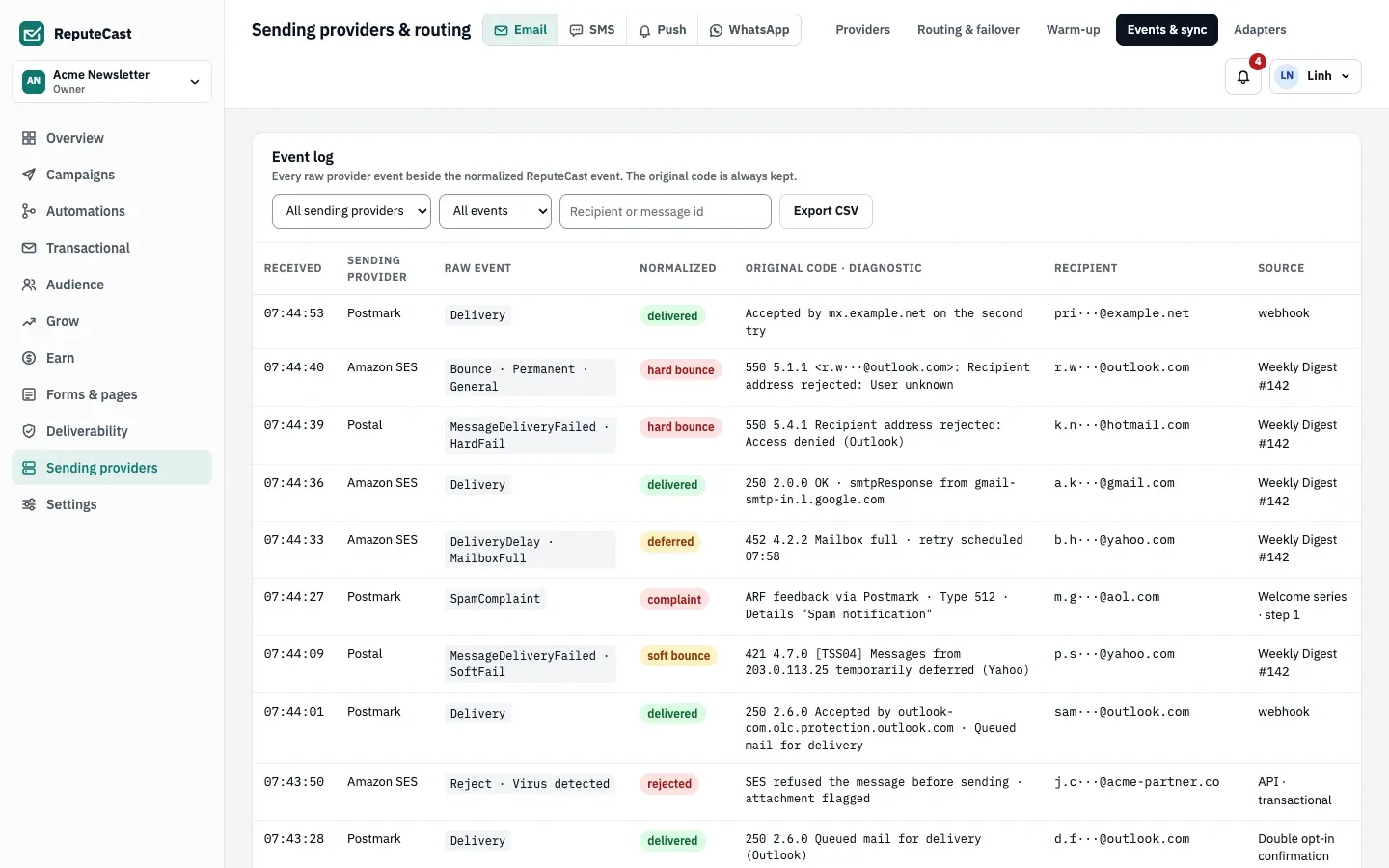
delivered,deferred,hard_bounce,soft_bounce,complaint,rejected,open,clickorunsubscribe. The original type (“Bounce · Permanent · General”) and code (“550 5.1.1”) stay with it. - A bounce also gets a bounce class, read from the enhanced status code and the diagnostic text, so the same reply means the same thing at every sending provider.
- A hard bounce, a complaint and an unsubscribe reported by the provider put the address on the shared suppression list at once, and the contact’s status changes to bounced or complained. Suppression sync then pushes the address to every connected sending provider that accepts suppressions, so one bounce stops mail everywhere.
- A soft bounce or a deferral doesn’t suppress an address on its own. They count in reports and in the live monitor. Transactional mail adds one rule: when a Transactional message soft-bounces and the address has soft-bounced 3 times within 7 days, the address is suppressed.
- Bounce and complaint rates feed guarded sending: when a campaign’s rates cross the auto-pause thresholds, ReputeCast holds the affected share.
Copies sent by a placement test to your own seed mailboxes are the one exception: their bounces and complaints never suppress the seed.
Every raw event and its normalized form appear side by side under Sending providers, then Events & sync.
Bounce classes
Section titled “Bounce classes”Campaign reports group bounces by class in their bounces table, with each sending provider’s original codes, and say what happened to the addresses.
| Class | What the receiver said | Row in the report | What happens |
|---|---|---|---|
mailbox_unknown |
The address doesn’t exist (5.1.1, “user unknown”) |
Hard · unknown user | Suppressed automatically |
domain_invalid |
The domain doesn’t exist or has no mail server | Hard · domain not found | Suppressed automatically |
mailbox_full |
The mailbox is over quota (4.2.2, 5.2.2) |
Soft · mailbox full | Retried with the next send |
temporary |
A temporary failure that never cleared | Soft · deferral expired | Retried with the next send |
policy_block |
Refused by policy, often authentication (5.7.1, 5.7.26) |
Blocked · policy or reputation | You decide; the report offers to suppress them |
spam_block |
Refused as spam, or because of a blocklist listing | Blocked · policy or reputation | You decide; the report offers to suppress them |
reputation |
Refused or throttled because of sender reputation | Blocked · policy or reputation | You decide; the report offers to suppress them |
other |
No code ReputeCast can classify | Other | You review it |
A blocked bounce that the sending provider reported as permanent is still a hard bounce, so it is suppressed at once like any other. The report shows which addresses of each row are already on the list and offers to add the rest. Blocked bounces usually point at your sending setup rather than at the address: check SPF, DKIM and DMARC and blocklist listings, and look the code up in SMTP error codes.
Complaints and Gmail’s feedback loop
Section titled “Complaints and Gmail’s feedback loop”Most mailbox providers send one report per complaint to your sending provider, which ReputeCast receives as a
complaint event. Gmail works differently: its feedback loop reports aggregate spam rates per identifier in Google
Postmaster Tools, keyed by a Feedback-ID header in the message
(Gmail Help, “Feedback Loop”, checked October 2026). ReputeCast adds
that header to Broadcasts, Automations and Transactional mail:
Feedback-ID: <campaign, automation or template>:<workspace>:<stream>:reputecastThe identifiers group Gmail’s data per campaign, per workspace and per stream. With HostRepute connected, the Postmaster Tools figures, including flagged campaigns, appear under Deliverability.
Sending provider account limits
Section titled “Sending provider account limits”Sending providers watch your account’s bounce and complaint rates and can stop you from sending when they get too high. Amazon SES, for example, publishes two levels for each rate (Amazon SES sending review process FAQs, checked October 2026):
| Rate | Account under review | Sending may be paused |
|---|---|---|
| Bounce rate | 5% or more | 10% or more |
| Complaint rate | 0.1% or more | 0.5% or more |
Amazon SES counts only hard bounces to domains you haven’t verified, and complaints only from mailbox providers that send feedback, measured over a “representative volume” of your mail rather than a fixed period. Its advice is to stay below 2% bounces and below 0.1% complaints.
ReputeCast stores Amazon SES’s two levels with every SES connection and shows each sending provider’s bounce and complaint rate for the last 7 days under Monitor domain and provider health, next to the limit it applies to that provider. The bar warns from half of the first limit on. Self-hosted servers such as Postal or an SMTP server have no account limits; the line shown there is the guard ReputeCast sets, or the warm-up guard while the server is warming up.
Auto-pause thresholds
Section titled “Auto-pause thresholds”ReputeCast’s own thresholds apply during each campaign, per mailbox provider and sending provider. They sit at or below the levels that get an Amazon SES account reviewed, so a bad send stops before it harms the account.
| Setting | Default | How to change |
|---|---|---|
| Bounce rate (hard and soft bounces per message sent) | 2.0% | Settings › Providers, 0.1–50%; per campaign in Review & send, 0.1–20% |
| Complaint rate (per message delivered) | 0.10% | Settings › Providers, 0.01–5%; per campaign in Review & send, 0.01–5% |
| Complaint rate per mailbox provider (Gmail, Outlook, Yahoo, iCloud, other) | 0.10%, the same as the complaint rate unless set separately | Settings › Providers, 0.01–5%; per campaign in Review & send, 0.01–5% and at most 5 times the complaint rate |
| Deferral rate per mailbox provider | 5.0% | Fixed |
| What a tripped threshold pauses | Only the affected mailbox provider or sending provider (route) | Settings › Providers › Pause scope, or per campaign in Review & send; route or the whole campaign |
| How often rates are checked during a send | Every 2 s | Fixed |
| Bounces, complaints or deferrals needed before a rate can trip | 5 | Fixed |
| Confidence that a rate is above its threshold before it trips | About 90% | Fixed |
| Messages before a mailbox provider's or sending provider's rates count | 500 messages | Fixed |
| Messages before campaign-wide rates count | 1,000 messages | Fixed |
| Provider outage during a send holds the provider's share after | 3 minutes of failed calls (at least 5 calls), or as soon as the provider is marked down | Fixed |
| Retry of a held share | Every 60 s for 15 minutes, then a person is asked again | Retry on the held share in the live monitor (needs campaigns:send) |
| Retries of a message that failed temporarily | Up to 10 attempts, after 5 s, 10 s, 20 s, 40 s, then every 60 s | Fixed |
| Campaign thresholds can be changed until | The send starts | Review & send; later changes to the workspace defaults don't affect a send that has started |
When to change them
Section titled “When to change them”- Keep the defaults while you warm up a new domain or IP, or after a migration: they catch a bad list before a sending provider does.
- Raise a threshold for one campaign in Review & send only when you know why the rate will be high, for example a re-permission campaign to an old list, and send it to a small segment first.
- Lower the bounce threshold if a sending provider’s own limit is stricter than ReputeCast’s default.
See Monitor a send and auto-pause for what happens when a threshold trips, and Workspace sending defaults for where the workspace defaults live.