
Gmail, Yahoo and Microsoft bulk sender requirements
Gmail, Yahoo and Microsoft bulk sender requirements set the minimum for mail to reach their users: authenticated, aligned with the From address, with a working unsubscribe, and rarely reported as spam. This page lists the rules of each mailbox provider and shows where Send Readiness checks each one before a campaign goes out. The rules below were checked in October 2026; mailbox providers change them, so follow the linked sources for the current text.
Who counts as a bulk sender
Section titled “Who counts as a bulk sender”- Gmail: anyone who sends close to 5,000 messages or more to personal Gmail accounts within 24 hours. Messages from all subdomains of the same primary domain count together, and the status is permanent once reached. The rules apply to personal Gmail accounts, not to Google Workspace accounts. Since November 2025, Gmail has been ramping up enforcement, including temporary and permanent rejections of mail that doesn’t meet them (Google, “Email sender guidelines” and FAQ).
- Yahoo: Yahoo doesn’t publish a number; a bulk sender sends “a significant volume of mail”, judged by the authenticated domain or the From domain (Yahoo Sender Hub, “Sender Best Practices” and FAQ).
- Microsoft: domains that send more than 5,000 messages a day to Outlook.com consumer addresses (hotmail.com,
live.com, outlook.com). Since May 5, 2025, mail that fails the authentication rules is rejected with
550; 5.7.515 Access denied, sending domain [SendingDomain] does not meet the required authentication level.(Microsoft, “Outlook’s new requirements for high-volume senders”). See Outlook 550 5.7.515.
ReputeCast doesn’t count your daily volume against these thresholds. Send Readiness applies the same checks to every email campaign, whatever its size, so the rules it covers are already in place when your list grows past 5,000.
The requirements and where ReputeCast checks them
Section titled “The requirements and where ReputeCast checks them”| Requirement | Gmail | Yahoo | Microsoft (Outlook.com) | Where ReputeCast checks it |
|---|---|---|---|---|
| SPF and DKIM | Both; SPF or DKIM for smaller senders | Both; SPF or DKIM for smaller senders | SPF must pass, DKIM must pass | Send Readiness, Authentication: blocks when SPF doesn’t authorize the sending provider or DKIM isn’t verified (set them up) |
| DKIM key of 1024 bits or more | Required | Recommended | — | Authentication: warns when a key is shorter than 1024 bits |
DMARC record, at least p=none |
Required | Required, and DMARC must pass | Required | Authentication: blocks without a valid DMARC record. Compliance, bulk-sender row: warns as well |
| From domain aligned with SPF or DKIM | Required | Required; relaxed alignment is enough | Required; both preferred | Authentication: warns when under 90% of mail aligned in the last 7 days of DMARC reports, and when the return path keeps SPF from aligning |
| One-click unsubscribe (RFC 8058) | Required for marketing mail | Required for marketing mail; POST recommended, mailto accepted | Not required; a working unsubscribe link is recommended | Added to every Broadcast and Automation message. Compliance: passes with the headers, warns when the public URL isn’t HTTPS (how it works) |
| Visible unsubscribe link in the body | Required | Required; it may lead to a preference page | Recommended | Compliance, footer: blocks when the body has no unsubscribe link or postal address |
| Unsubscribes honored quickly | Within 48 hours | Within 2 days | — | Not a check: a one-click unsubscribe takes effect in the same request |
| Spam rate | Below 0.3% in Postmaster Tools; aim below 0.1% | Below 0.3% | No number published | Compliance, bulk-sender row: warns at 0.1%, blocks at 0.3%. While sending, auto-pause at 0.10% |
| Forward and reverse DNS (PTR) for sending IPs | Required | Required | — | Not in Send Readiness. Deliverability health shows reverse DNS for dedicated IPs |
| TLS for the connection | Required | — | — | Not checked. The sending provider, or your SMTP server, makes the connection |
| Message format (RFC 5322) | Required | RFC 5321 and RFC 5322 | — | Not a separate check: ReputeCast and the sending provider build the message |
| Valid From and Reply-To that accept replies | — | — | Recommended | Not checked beyond Authentication blocking a campaign without a sender |
Sources, checked October 2026: Google, “Email sender guidelines” and its FAQ, Yahoo Sender Hub and Microsoft’s announcement.
How the Send Readiness checks decide
Section titled “How the Send Readiness checks decide”- Authentication checks the stored DNS records of the campaign’s sending domain against what each sending provider in the route needs. A missing SPF authorization, unverified DKIM or a missing or invalid DMARC record is a Block: the send can’t start.
- Compliance has three rows. “One-click unsubscribe headers present” passes when the instance’s public URL uses HTTPS. The footer row looks for an unsubscribe link and a postal address in the compiled email. The bulk-sender row passes as “Bulk-sender requirements met” when DMARC is valid and the complaint rate is under 0.1%.
- The complaint rate in the bulk-sender row is the 7-day complaint rate that the sending providers of the route report, weighted by recipients. It isn’t Gmail’s spam rate from Postmaster Tools, which ReputeCast shows on the Health page when HostRepute is connected.
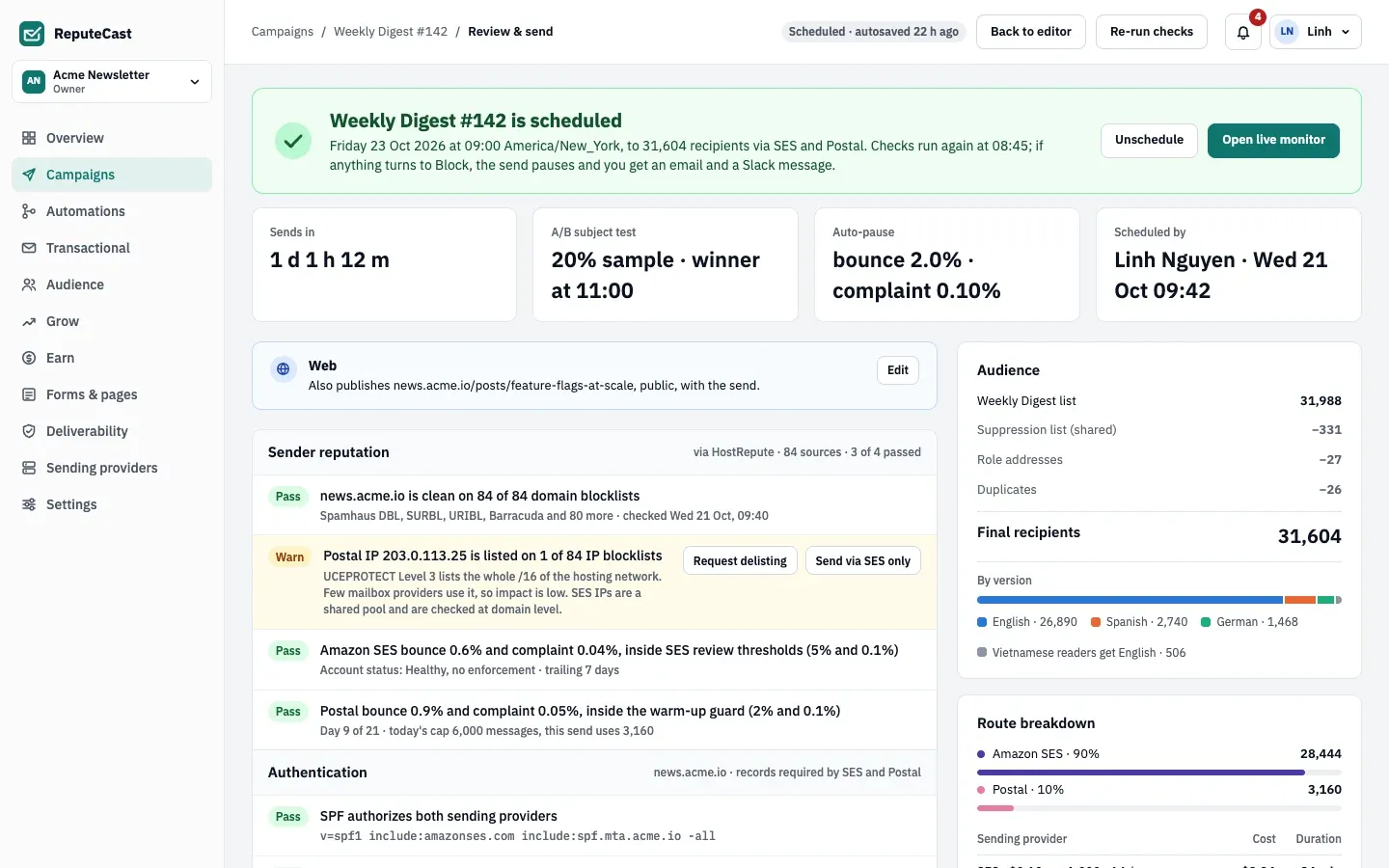
- The verdict. This campaign is scheduled, and the checks run again before it starts.
- The check groups, starting with sender reputation and authentication; compliance follows further down.
- The audience after the suppression list, role addresses and duplicates are removed.
- The actions for the scheduled send.
Defaults and limits
Section titled “Defaults and limits”The bulk-sender row’s limits are fixed: a warning from a 0.1% complaint rate, a Block from 0.3%. While a campaign sends, guarded sending watches the same signals live and auto-pauses at these defaults:
| Setting | Default | How to change |
|---|---|---|
| Bounce rate (hard and soft bounces per message sent) | 2.0% | Settings › Providers, 0.1–50%; per campaign in Review & send, 0.1–20% |
| Complaint rate (per message delivered) | 0.10% | Settings › Providers, 0.01–5%; per campaign in Review & send, 0.01–5% |
| Complaint rate per mailbox provider (Gmail, Outlook, Yahoo, iCloud, other) | 0.10%, the same as the complaint rate unless set separately | Settings › Providers, 0.01–5%; per campaign in Review & send, 0.01–5% and at most 5 times the complaint rate |
| Deferral rate per mailbox provider | 5.0% | Fixed |
| What a tripped threshold pauses | Only the affected mailbox provider or sending provider (route) | Settings › Providers › Pause scope, or per campaign in Review & send; route or the whole campaign |
| How often rates are checked during a send | Every 2 s | Fixed |
| Bounces, complaints or deferrals needed before a rate can trip | 5 | Fixed |
| Confidence that a rate is above its threshold before it trips | About 90% | Fixed |
| Messages before a mailbox provider's or sending provider's rates count | 500 messages | Fixed |
| Messages before campaign-wide rates count | 1,000 messages | Fixed |
| Provider outage during a send holds the provider's share after | 3 minutes of failed calls (at least 5 calls), or as soon as the provider is marked down | Fixed |
| Retry of a held share | Every 60 s for 15 minutes, then a person is asked again | Retry on the held share in the live monitor (needs campaigns:send) |
| Retries of a message that failed temporarily | Up to 10 attempts, after 5 s, 10 s, 20 s, 40 s, then every 60 s | Fixed |
| Campaign thresholds can be changed until | The send starts | Review & send; later changes to the workspace defaults don't affect a send that has started |
When to change them
Section titled “When to change them”You can’t change the Send Readiness limits. You can tighten the auto-pause thresholds per workspace in Settings, then Providers or per campaign in Review & send. Keep the complaint threshold at 0.10% or lower: Gmail recommends staying under 0.1% and makes bulk senders above 0.3% ineligible for its delivery mitigation. If Gmail starts deferring mail with a rate limit such as Gmail 421 4.7.28, slow down with a warm-up plan instead of raising thresholds.