
Move Amazon SES out of the sandbox
New Amazon SES accounts start in the SES sandbox in every AWS Region. This guide shows how to file an Amazon SES production access request from ReputeCast’s setup wizard, what to write in it, and how to raise your sending quota once AWS has approved it.
What the sandbox means
Section titled “What the sandbox means”While a Region of your AWS account is in the sandbox, Amazon SES delivers only to verified addresses and domains (or the SES mailbox simulator), at most 200 messages per 24 hours and 1 message per second. Sandbox status is separate for each Region (Amazon SES Developer Guide, “Request production access”, checked October 2026).
ReputeCast detects it for you:
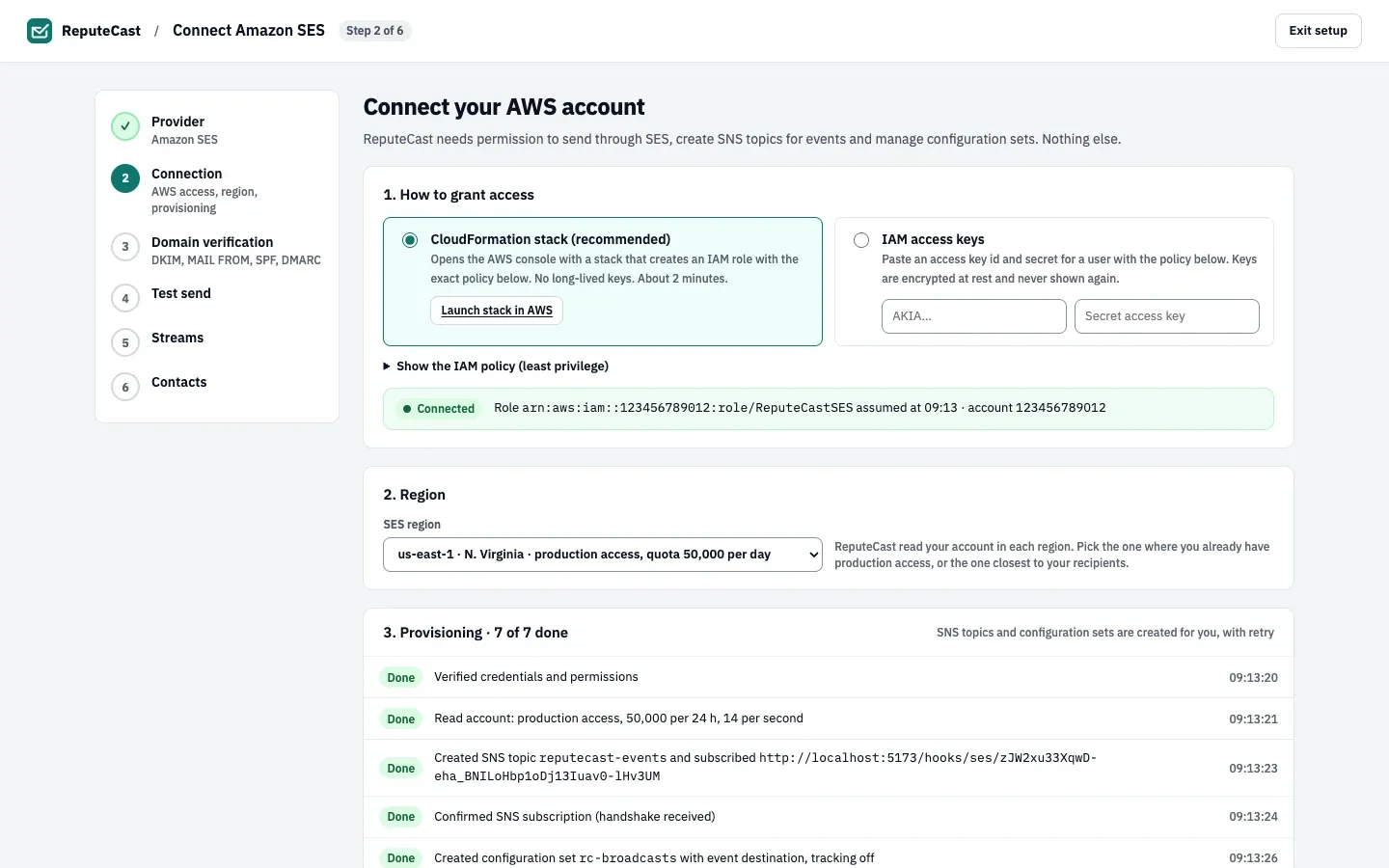
- When you connect Amazon SES, ReputeCast reads your account in every Region and shows which ones already have production access, so you can pick one of those under SES region.
- A connection whose Region is still in the sandbox shows the status Sandbox · verified addresses only under Sending providers.
- Send Readiness blocks a campaign whose route uses a sandboxed provider, in its Routing group, because the mail would reach only verified addresses.
- The provider health check reads the account again every 5 minutes, so the status changes by itself once AWS grants production access.
Before you begin
Section titled “Before you begin”- You need
providers:manage, a sensitive permission. Owners and Admins have it. - ReputeCast files the request with the SES call
PutAccountDetails. The IAM policy that the CloudFormation stack creates, and the one shown for IAM access keys, already includeses:PutAccountDetails. - Verify your sending domain first: AWS recommends it, and approved requests still need verified identities for every From and Return-Path address (Add sending domains and senders).
- Have a public website for the publication and a description of how people sign up.
Request production access in ReputeCast
Section titled “Request production access in ReputeCast”-
Open Sending providers and connect Amazon SES (see Send with Amazon SES). Request production access in the Connection step.
-
Under SES region, pick the Region you will send from. When it is in the sandbox, a card names the Region and its sandbox quota and shows the request form.
-
Check the fields. ReputeCast fills them in from your workspace:
- In Website, the organization domain of your default sender.
- In Mail type, choose Marketing (newsletter) for newsletters, or Transactional if most of your mail is one-to-one.
- In Use case description (prefilled from your workspace), your lists, the number of opted-in contacts, and how bounces, complaints and unsubscribes are handled. It takes 20 to 5,000 characters. Replace it with your own text (see Request text you can copy).
- In Expected daily volume, how many emails you expect to send a day. ReputeCast adds it to the description.
- In Contact language, English or Japanese, the language AWS writes to you in.
-
Select the request button for that Region. ReputeCast files the request with your ReputeCast account’s email address as the contact for AWS’s answer, and records it in the audit log.
-
Wait for AWS. AWS gives an initial response within 96 hours and may ask for more information. Until then you can send only to verified addresses; you can’t edit the request while it is under review (Amazon SES Developer Guide, checked October 2026).
Request text you can copy
Section titled “Request text you can copy”AWS reads the description to see that you send only to people who asked for your mail and that you handle bounces, complaints and unsubscribes. Keep only the sentences that are true for your workspace, and fill in the parts in angle brackets.
<Publication> is a newsletter about <topic> from <company>, sent from <sending domain> to people whosubscribed on <website>. New subscribers confirm their address by clicking a link in a confirmationemail (double opt-in) before they receive anything. We never buy, rent or share lists.
We send <one issue a week> to about <number> subscribers, around <number> emails a day.
We send through ReputeCast, a self-hosted newsletter platform. Amazon SES reports bounces and complaintsto it through Amazon SNS. Hard bounces and complaints put the address on a suppression list at once,and it is never mailed again. A send pauses automatically when its bounce rate passes 2% or itscomplaint rate passes 0.1%.
Every message has a visible unsubscribe link and List-Unsubscribe and List-Unsubscribe-Post headersfor one-click unsubscribe (RFC 8058). Unsubscribes take effect immediately.
Contacts who have not opened or clicked in <180> days stop receiving issues.
The facts behind these sentences: Lists, consent and double opt-in, Bounces, complaints and provider limits, One-click unsubscribe (RFC 8058) and Keep your list healthy.
Request it in the AWS console instead
Section titled “Request it in the AWS console instead”If the provider is already connected, or you prefer to file the request yourself, use the SES console. These are the steps AWS documents (Amazon SES Developer Guide, checked October 2026):
-
Open the Amazon SES console in the Region you send from and choose Account dashboard.
-
In the box that says your account is in the sandbox, choose View Get set up page, then Request production access.
-
Choose Marketing or Transactional, enter your Website URL, up to 4 Additional contacts and the Preferred contact language.
-
Check the Acknowledgement box and choose Submit request.
The AWS CLI files the same request:
aws sesv2 put-account-details \ --production-access-enabled \ --mail-type MARKETING \ --website-url https://example.com \ --contact-language ENIf AWS asks for more details, answer in the support case with the text above.
Raise your sending quota
Section titled “Raise your sending quota”Production access comes with a daily sending quota and a maximum sending rate per Region. AWS raises them automatically for accounts that send wanted mail close to their quota with low bounce and complaint rates. To ask for more, open the Service Quotas console, choose Amazon Simple Email Service (SES) and request an increase of the sending quota or the sending rate; AWS answers within 24 hours (Amazon SES Developer Guide, “Increasing your Amazon SES sending quotas”, checked October 2026).
ReputeCast reads the new quota and rate with its next health check and shows them with the provider.
Check that it worked
Section titled “Check that it worked”- The provider’s status under Sending providers no longer shows Sandbox · verified addresses only.
- Send Readiness passes the bulk-marketing terms check in its Routing group.
Troubleshooting
Section titled “Troubleshooting”- “AWS didn’t take the request.” ReputeCast shows AWS’s error, and nothing was filed. An access denied error means
the IAM role or user lacks
ses:PutAccountDetails; update the policy and try again. - The request was denied. Read AWS’s answer in the support case. Reply with how people subscribe and how you handle bounces and complaints, using the text above.
- Production access in one Region, sandbox in another. Sandbox status is per Region. Move the connection to the Region with production access, or file a request for the other one.
- Approved, but the status still says sandbox. Wait for the next health check, at most 5 minutes.