
Keep your list healthy
List health sorts every contact into an engagement tier by how long ago they last opened or clicked, and a sunset policy decides what happens to the ones who stopped reading. This is ReputeCast’s email list hygiene: mailing people who never open hurts your sender reputation with every mailbox provider, so quiet contacts get one chance to come back before Broadcasts stop.
How tiers work
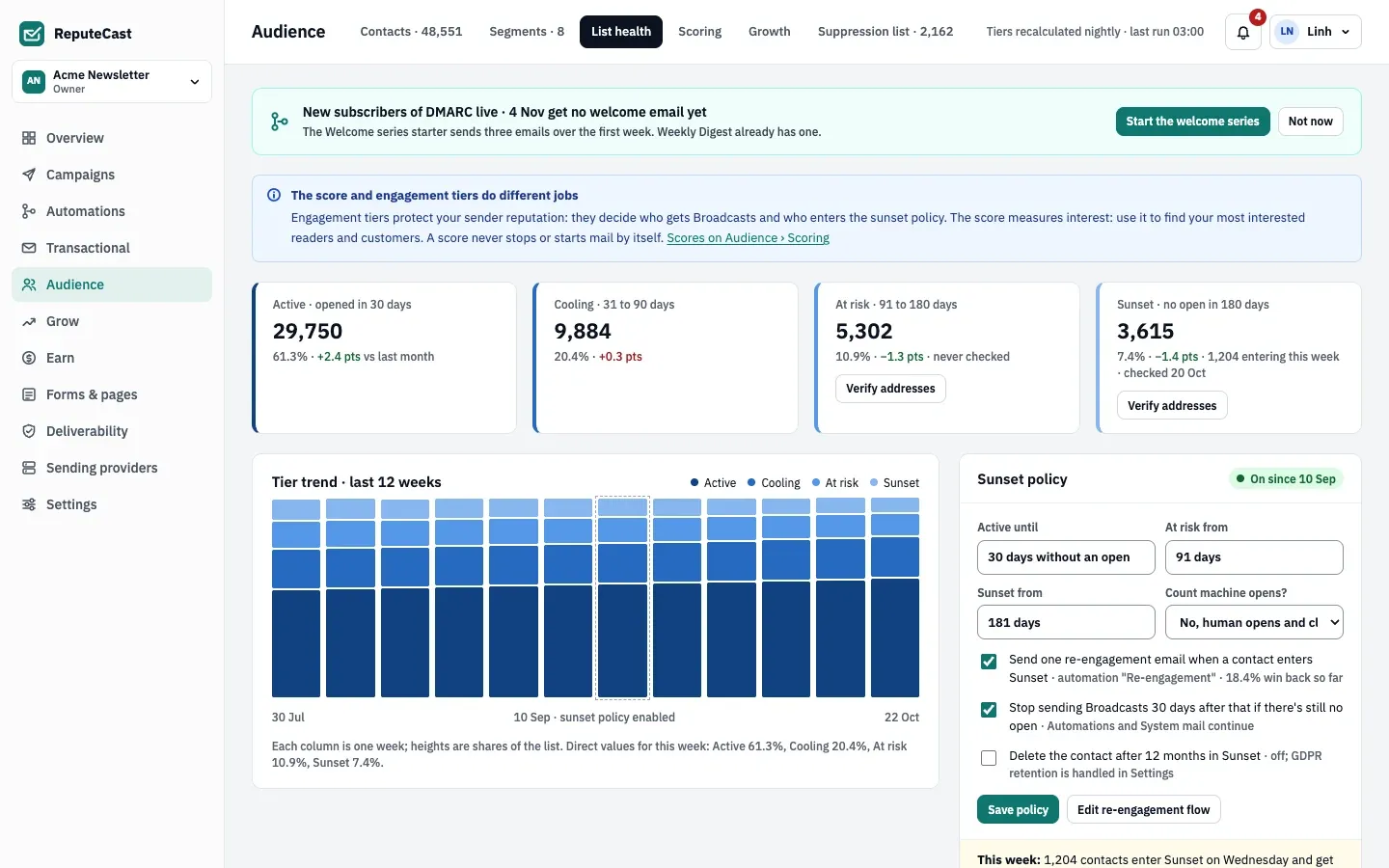
Section titled “How tiers work”- Engagement date. For each contact, ReputeCast takes the latest human open or click. Machine opens (Apple Mail Privacy Protection, image proxies that fetch mail as it arrives, security scanners) and clicks from link scanners don’t count. Engagement history carried over by an import counts. A contact who never engaged is measured from the day they joined.
- Tier. The number of days since that date puts the contact in Active, Cooling, At risk or Sunset, using the thresholds in the sunset policy.
- Nightly run. Tiers are recalculated once a night, at 03:00 in the workspace time zone. The page header shows the time of the last run. A saved policy change applies from the next run.
- Sunset actions. When a contact enters Sunset and the re-engagement email is on, ReputeCast adds the tag
sunsetto them (and removes it when they come back). After the set number of days without an open, Broadcasts stop for them; Automations and System mail continue. If you turned it on, the contact is erased after the set number of months in Sunset.
A contact who opens again moves back to Active on the next run, and the sunset tag and the Broadcast stop are
cleared.
Defaults and limits
Section titled “Defaults and limits”| Setting | Default | How to change |
|---|---|---|
| Active tier | Human open or click in the last 30 days | Audience › List health › Sunset policy, 1–3,650 days |
| Cooling tier | 31–90 days since the last engagement | Follows the Active and At risk settings |
| At risk tier | 91–180 days | Audience › List health › Sunset policy › At risk from, 2–3,650 days |
| Sunset tier | More than 180 days without engagement | Audience › List health › Sunset policy › Sunset from, 3–3,650 days |
| Tiers recalculated | Nightly at 03:00 in the workspace time zone | Fixed; the time zone is set in Settings › General |
| Sunset policy in a new workspace | On, with one re-engagement email when a contact enters Sunset | Audience › List health › Sunset policy |
| Broadcasts stop for Sunset contacts | 30 days after entering Sunset without an open | The switch is in the Sunset policy card; the day count (1–365) is set through the API (stopAfterDays) |
| Delete contacts after time in Sunset | Off; 12 months when turned on | The switch is in the Sunset policy card; the month count (1–120) is set through the API (deleteAfterMonths) |
| Undo or restore a deleted list | Undo for 10 s; Restore list from the audit log entry for 30 days | Fixed |
| Needs attention (last 30 days) | Complaints 0.1% or more, bounces 2% or more, or unsubscribes 0.5% or more | Fixed |
The sunset policy
Section titled “The sunset policy”The Sunset policy card on Audience, then List health holds
the thresholds and the actions. Saving it needs lists:manage (Owner, Admin and Editor).
- Active until, At risk from, Sunset from: the tier thresholds in days. At risk must start at least two days after Active ends, so Cooling has room, and Sunset must start after At risk.
- Count machine opens?: keep No, human opens and clicks only. Yes lets machine opens keep contacts Active, so people who never read your email stay in Broadcasts.
- Send one re-engagement email when a contact enters Sunset: tags new Sunset contacts
sunset. Build or edit the automation that sends the email with Edit re-engagement flow; make it start on the tagsunsetbeing added (see triggers). The “win back so far” rate is the share of contacts who left Sunset after entering it. - Stop sending Broadcasts N days after that if there’s still no open: on by default, 30 days.
- Delete the contact after N months in Sunset: off by default. When on, contacts are erased with their consent history; suppressions stay.
Select Save policy. The banner under the card says what happens this week, for example how many contacts enter Sunset and how many stop receiving Broadcasts.
Health per list
Section titled “Health per list”The Health per list table shows each list’s size, tier mix and net growth, and its human-open, unsubscribe, complaint and bounce rates for Broadcasts over the last 30 days. Each list gets a verdict:
| Verdict | When |
|---|---|
| Needs attention | Complaints 0.1% or more, bounces 2% or more, or unsubscribes 0.5% or more |
| Excellent | Human opens 50% or more, complaints under 0.02% and bounces under 1% |
| Good | Anything else, including lists with no sends yet |
A list’s menu offers Verify addresses… and Delete list. Deleting asks you to type the list’s name and shows what it affects: signup forms and automations that use the list pause, and scheduled campaigns come off the schedule. Contacts, their other lists and suppressions stay. Undo is offered for 10 seconds; after that, restore the list from its entry in Settings, then Audit log for 30 days.
When to change the defaults
Section titled “When to change the defaults”- Shorter thresholds suit daily newsletters, where 30 days without an open is a long silence. Longer ones suit monthly or quarterly sends, where a reader can’t open more often than you send.
- Keep the Broadcast stop on. Contacts who haven’t opened for 180 days or more raise bounce and complaint rates and drag down inbox placement for everyone else.
- Verify At risk and Sunset addresses before a win-back campaign: the At risk and Sunset tier cards have a Verify addresses button. See Verify email addresses.
- Turn on deletion only if your privacy policy promises to remove inactive people. Erasing can’t be undone.
The score is a different measure: tiers protect deliverability and decide who gets Broadcasts; the score measures interest and never stops or starts mail by itself.
Related
Section titled “Related”- The suppression list
- Build segments with tier conditions
- Bounces, complaints and provider limits
- Read campaign reports, including human and machine opens